Send a photo and a line of text. Parker drafts the case, asks for anything that’s missing, and attaches the photo when you confirm.
Snap. Tap. Confirm. Send Parker a photo of the problem and a line about it. Parker drafts a Salesforce case with the account, the equipment, and the details your workspace needs, then saves it, with the photo attached, when you confirm.
Your admin has turned on case logging for your workspace. If Parker doesn’t offer to open a case, ask your admin.
Log a case
1
Send the photo
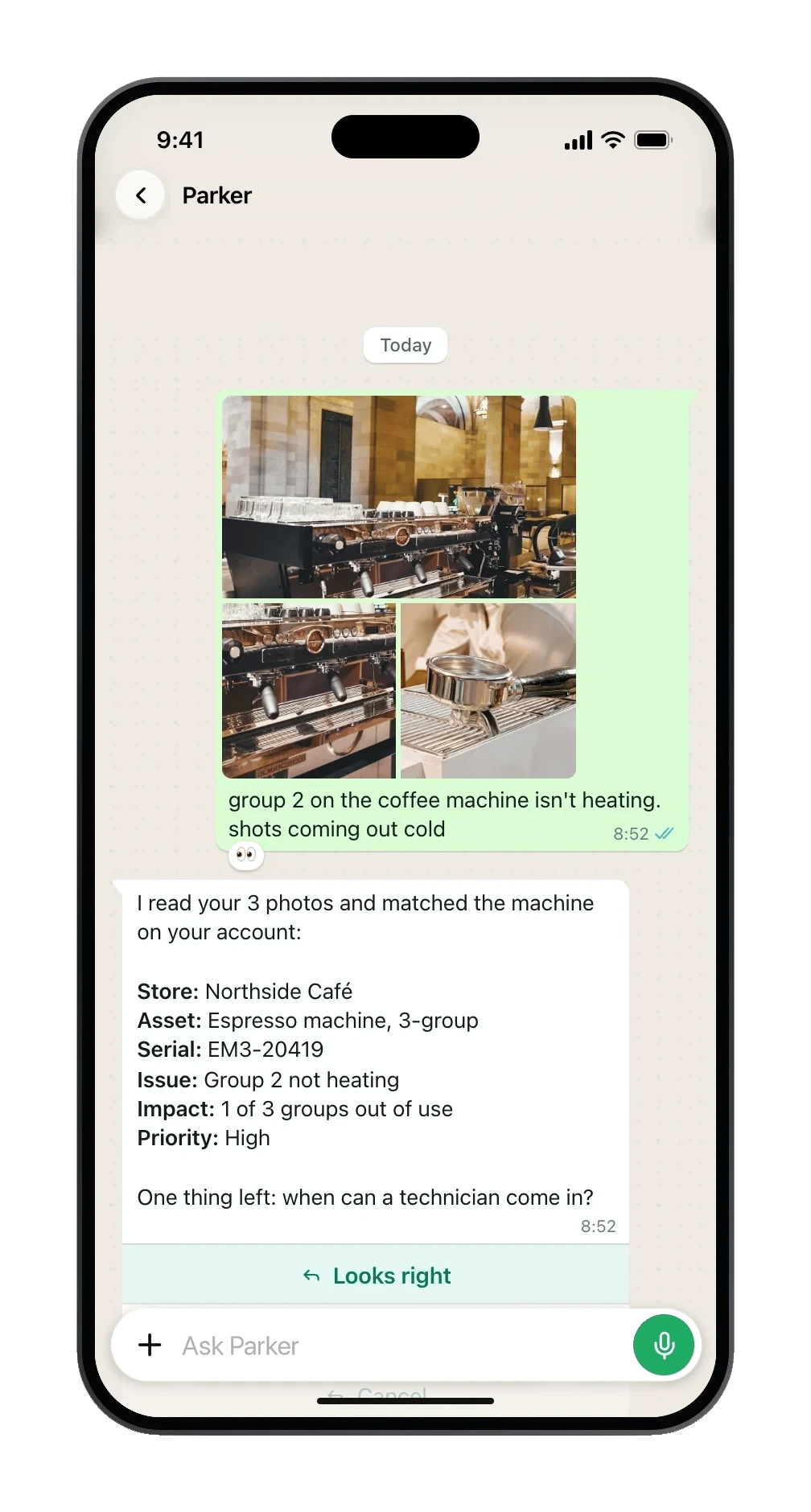
Take a photo of the fault, such as the label on a machine or the damage. Add a caption that says what’s wrong, such as “Group 2 not heating at Northside Café.” You can also send the photo first and type “log a case”.Parker offers to open a case, with Open a case and Ignore.
2
Pick the account
If your caption names the account exactly, Parker uses it. Otherwise it shows a list of likely accounts to pick from. Parker asks rather than picking one for you.
3
Check the summary
Parker shows what it has so far, with Looks right, Change something, and Cancel.
Looks right moves on to anything that’s still missing.
Change something lists the fields so you can pick one to change.
Parker reads the photos, matches the machine, and asks for what's left.
4
Answer anything missing
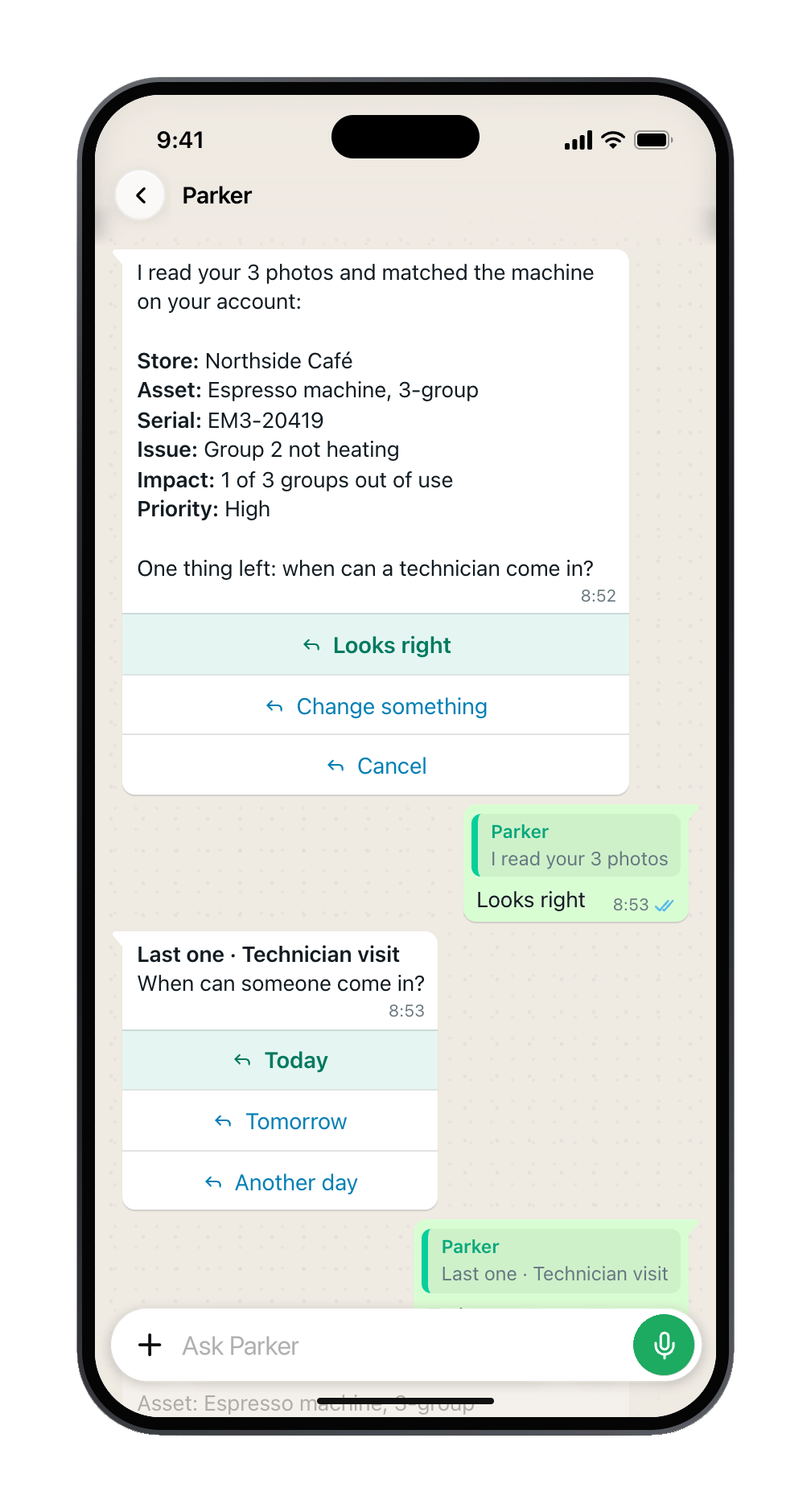
Parker asks for each missing field, one at a time. Choices arrive as a list, dates offer Today and Yesterday, and records you’ve used before are offered first. If several fields are missing, Parker may offer a short form instead. Type form to ask for it.
One question at a time, with one-tap answers.
5
Confirm
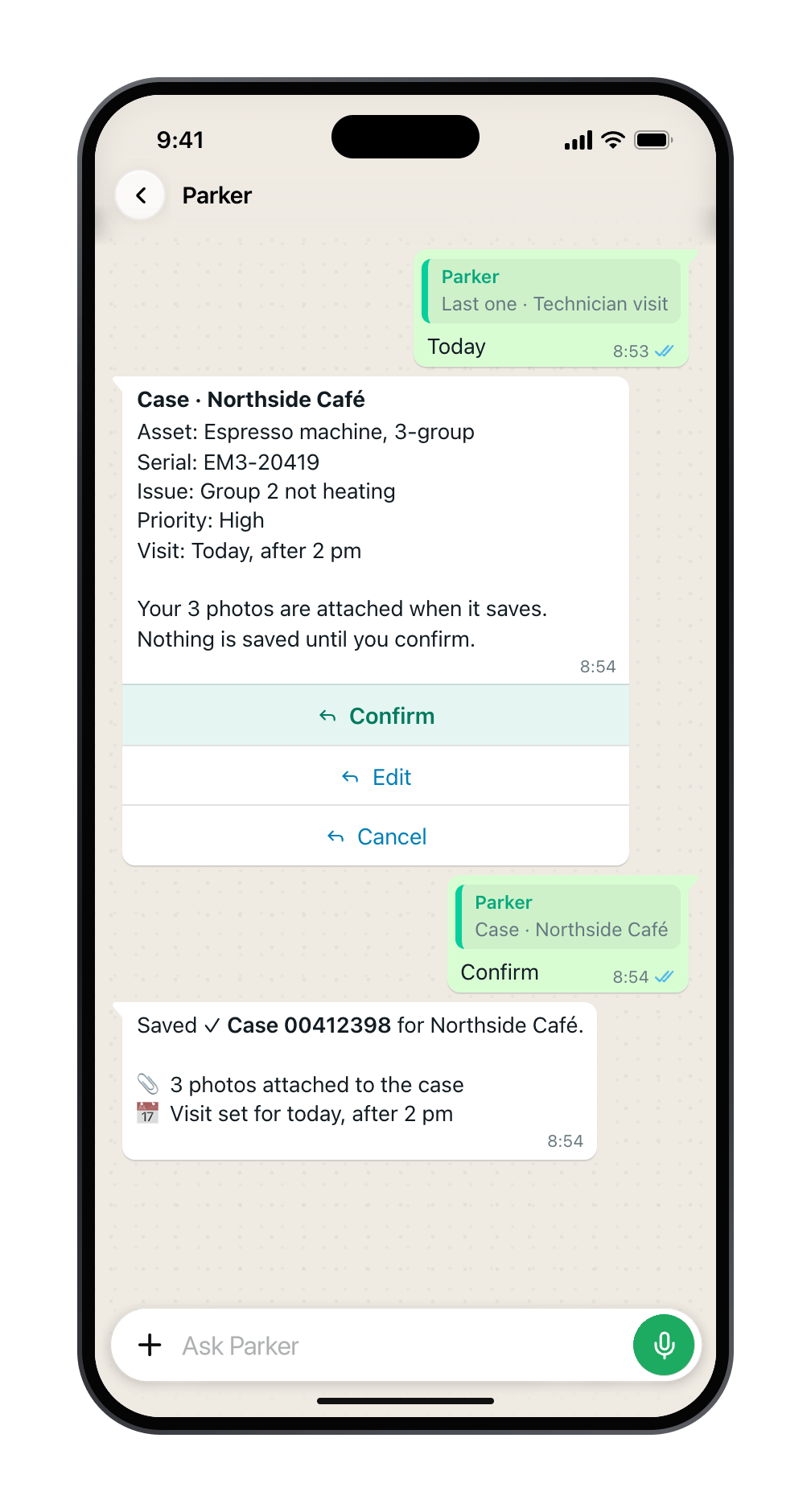
Parker shows the case card. Select Confirm. Parker saves the case, attaches the photo, and replies with the case number.
Nothing is saved until you confirm. Then the photos go onto the case.
Nothing is saved until you confirm.Before Parker creates or changes a Salesforce record, it shows the change field by field. Nothing is written until you select Confirm. In the Parker app the card offers Confirm, Edit, and Cancel. In the web app it offers Confirm and Reject.See How Parker acts on your behalf.
Change something: pick the field to change.
Let Parker read the label
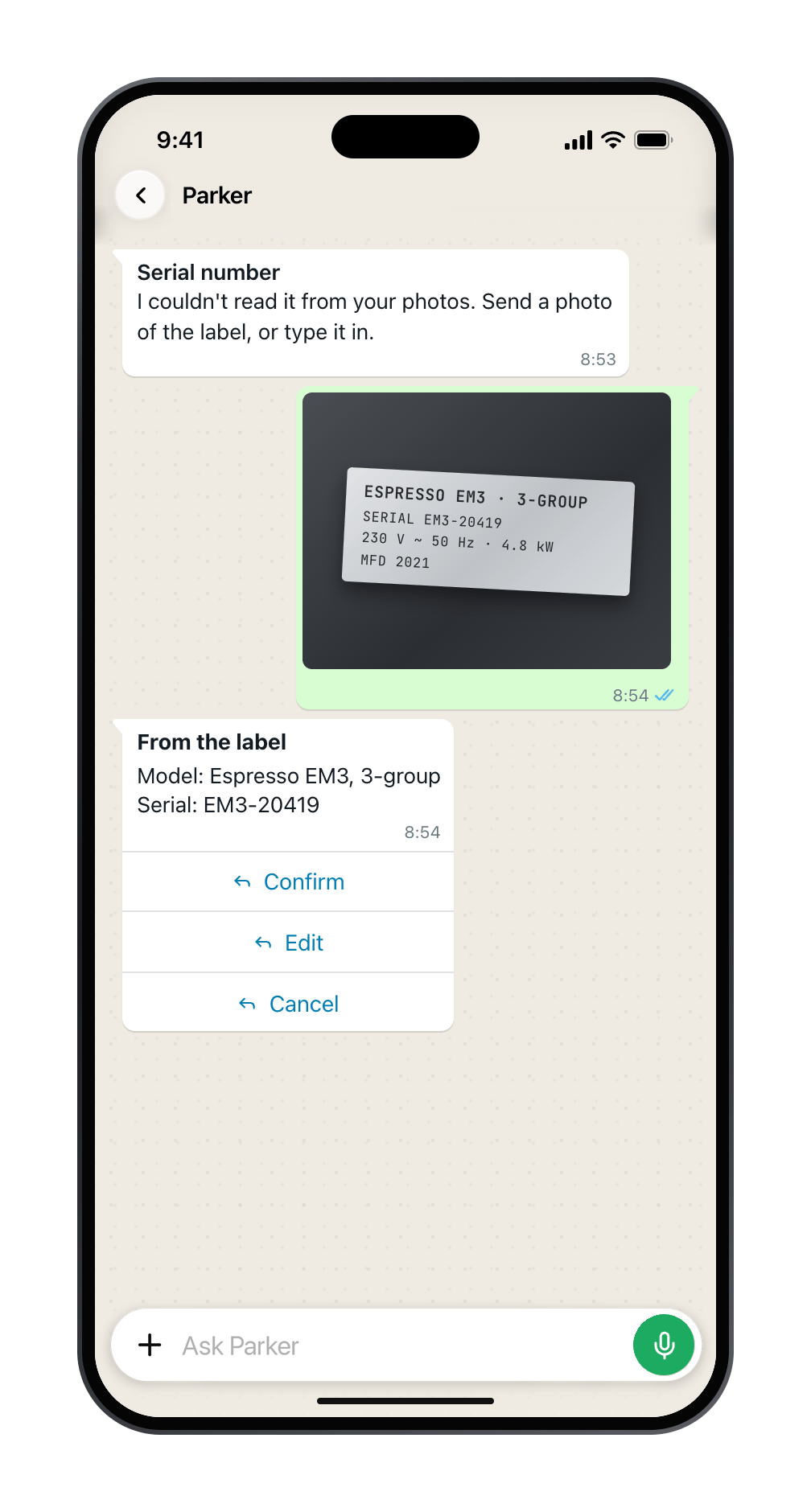
When Parker asks for details such as a serial number or model, you can send a photo of the label instead of typing. Parker reads it and suggests the values. They’re only suggestions: check them, then tap to accept or change them.
Send a photo of the label, and Parker reads the model and serial.
Send more than one photo
You can attach up to 5 photos to a case, each under 10 MB. Photos you send within 2 minutes of each other are added to the same case, and Parker acknowledges each one as it arrives.
Each photo is acknowledged, and all of them are attached when the case saves.
Videos are attached as they are, but Parker can’t read anything from a video. To have Parker read a label or fault, send a photo.
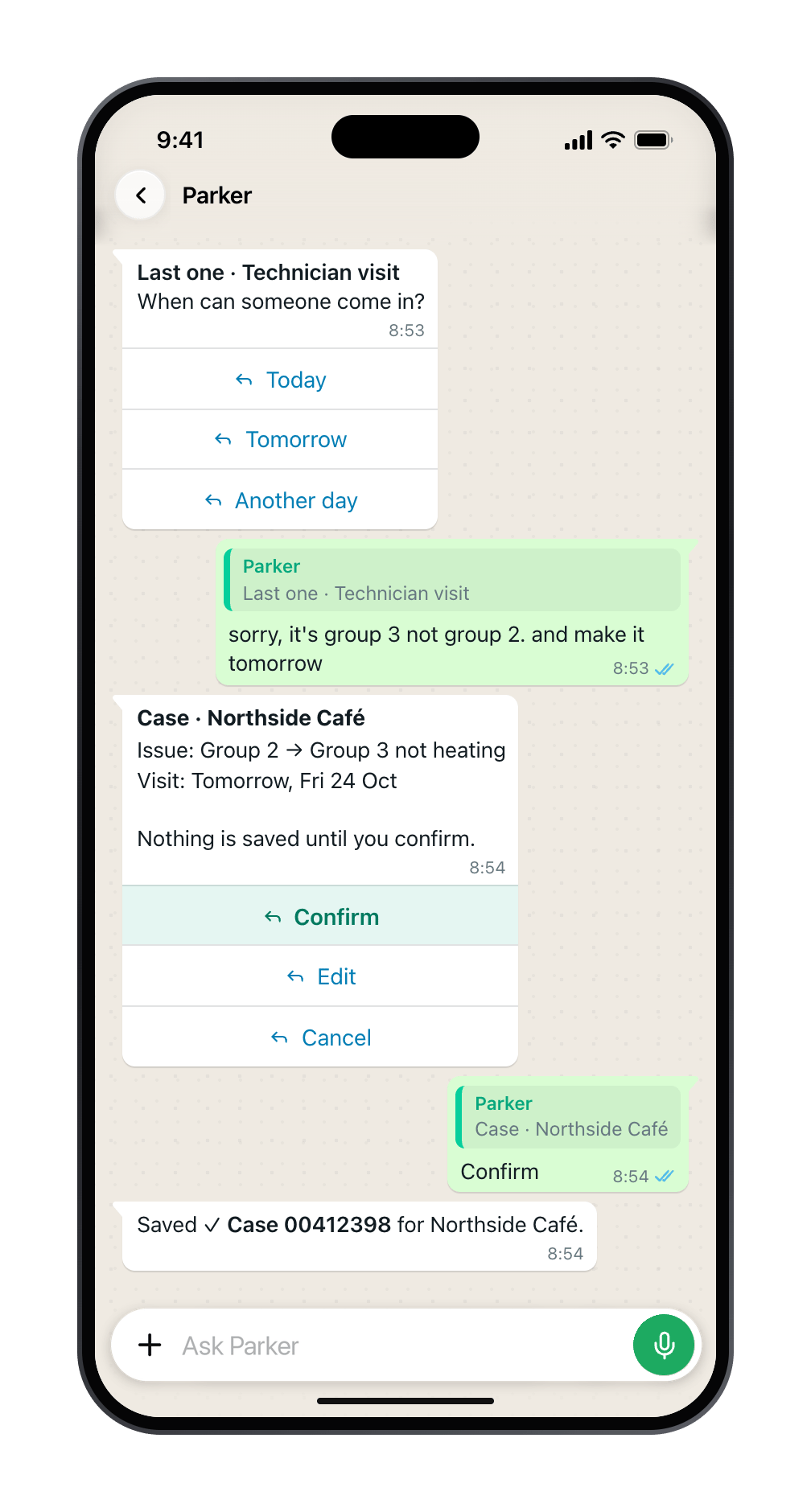
Correct an answer
Swipe to reply to the question you want to change, and type the new answer. Parker shows what it will change, and updates the case before you confirm it. See Confirm, edit, and correct.
A swipe-reply fixes the group and moves the visit. Confirm applies both.
Finish in the web app
If you’d rather finish on a bigger screen, open the chat in the Parker web app. The case form there starts from the answers you already gave on your phone, and shows where each one came from.
Troubleshooting
Parker didn't offer to open a case
Add a caption that says what’s wrong, or type “log a case” after the photo. If Parker still doesn’t offer, case logging may not be turned on for your workspace. Ask your admin.
Salesforce refused the case
A validation rule or required field stopped the save. Parker quotes your org’s message and asks for the missing details once. If it still can’t save, it gives you a link to finish the case in the web app. See When Salesforce says no.
The photo isn't on the case
Photos are attached right after the case is saved, so the case number comes first. If a photo fails to attach, Parker says Case created, the photo didn’t attach and offers Retry attach. Tap it once; Parker checks whether the photo is already on the case before adding it. If the retry fails too, open the case in Salesforce and add the photo there, and tell your Parker admin the case number. In Test mode, the photo isn’t sent to Salesforce at all, and Parker says so.
Parker can't find the right account
Parker shows only accounts your Salesforce login can see. Type the account’s exact name, or check your access with your Salesforce admin.
Still need help?
Check Troubleshooting for the exact message you see. If a setting is admin-only, ask your Parker admin. For anything else, contact support.
Related
Confirm, edit, and correct
How confirmation cards work.
When Salesforce says no
Validation rules and missing fields.
Last modified on November 13, 2026
{"docsConfig":{"theme":"mint","$schema":"https://mintlify.com/docs.json","name":"Parker","description":"Parker brings your Salesforce to your phone. Log a job from a photo, update a record in a sentence, or ask about any account, under your own Salesforce permissions. This guide shows field teams and workspace admins how to use and set up Parker.","colors":{"primary":"#0E0F14","light":"#FAFAFA","dark":"#6B6D74"},"logo":{"light":"https://mintcdn.com/fieldko/gQQQTzgnEI8jXGZe/logo/parker-wordmark-light.svg?fit=max\u0026auto=format\u0026n=gQQQTzgnEI8jXGZe\u0026q=85\u0026s=e45f73f00023e0567ee61b3ba448d381","dark":"https://mintcdn.com/fieldko/gQQQTzgnEI8jXGZe/logo/parker-wordmark-dark.svg?fit=max\u0026auto=format\u0026n=gQQQTzgnEI8jXGZe\u0026q=85\u0026s=4075960263d05b1a70e64bd8b8ff36a3","href":"/introduction"},"favicon":"https://mintcdn.com/fieldko/TQb5sudGzkhO7GE1/logo/parker-favicon.svg?fit=max\u0026auto=format\u0026n=TQb5sudGzkhO7GE1\u0026q=85\u0026s=69258631234fa5f43beebbbfe21d0309","appearance":{"default":"system","strict":true},"background":{"color":{"light":"#FFFFFF","dark":"#09090B"}},"navbar":{"links":[{"href":"/admin/quickstart","label":"For admins"},{"href":"/changelog","label":"What's new"},{"href":"/reference/contact-support","label":"Help"}],"primary":{"type":"button","label":"Open Parker","href":"https://app.fieldko.ai"}},"search":{"prompt":"Search the Parker guide…"},"seo":{"metatags":{"og:site_name":"Parker Support","og:locale":"en_AU","twitter:card":"summary_large_image"},"organization":{"name":"FieldKo","legalName":"FieldKo Holdings Pty Ltd","url":"https://parker.work"},"indexing":"navigable"},"fonts":{"family":"Inter","weight":400},"icons":{"library":"lucide"},"styling":{"eyebrows":"breadcrumbs","codeblocks":"system","latex":false},"contextual":{"options":["copy","chatgpt","claude"],"display":"header"},"metadata":{"timestamp":true},"navigation":{"pages":[]}},"deployment":{"deploymentMetadataValue":{"subdomain":"fieldko","hasAudioNarration":false,"actualSubdomain":"fieldko","customDomains":["support.parker.work"],"gitSource":{"type":"github","owner":"fieldko","repo":"parker-docs","deployBranch":"main","contentDirectory":"","isPrivate":true,"mountPath":"","label":""},"entitlements":{},"buildId":"6af70223a071dcdd90fdfd4b","clientVersion":"0.0.4142","searchFilterCounts":[{"language":"default","tag":"Using Parker","count":49},{"language":"default","tag":"Admin","count":18},{"language":"default","tag":"Reference","count":13},{"language":"default","tag":"Ask Parker","count":9},{"language":"default","tag":"Parker on your phone","count":8},{"language":"default","tag":"Do your job from your phone","count":8},{"language":"default","tag":"Govern \u0026 monitor","count":7},{"language":"default","tag":"Configure Parker","count":6},{"language":"default","tag":"Set up your workspace","count":5},{"language":"default","tag":"Get started","count":5}]},"assistantConfig":{},"basePath":"","hasChatPermissions":false,"hasWebMcpPermissions":false,"toggles":[{"name":"kill-isr","enabled":true,"variant":{"name":"disabled","enabled":false,"feature_enabled":true},"impressionData":false},{"name":"custom-rbac-roles","enabled":true,"variant":{"name":"disabled","enabled":false,"feature_enabled":true},"impressionData":false},{"name":"agent-mintlify-slack","enabled":true,"variant":{"name":"disabled","enabled":false,"feature_enabled":true},"impressionData":false},{"name":"agent-integrations-settings","enabled":true,"variant":{"name":"disabled","enabled":false,"feature_enabled":true},"impressionData":false},{"name":"rbac-expansion","enabled":true,"variant":{"name":"disabled","enabled":false,"feature_enabled":true},"impressionData":false},{"name":"automations-pr-grouping","enabled":true,"variant":{"name":"disabled","enabled":false,"feature_enabled":true},"impressionData":false},{"name":"custom-prefix","enabled":true,"variant":{"name":"disabled","enabled":false,"feature_enabled":true},"impressionData":false},{"name":"analytics-v7","enabled":true,"variant":{"name":"disabled","enabled":false,"feature_enabled":true},"impressionData":false},{"name":"user-flows-analytics","enabled":true,"variant":{"name":"disabled","enabled":false,"feature_enabled":true},"impressionData":false},{"name":"no-publish-flow","enabled":true,"variant":{"name":"disabled","enabled":false,"feature_enabled":true},"impressionData":false},{"name":"workos-onboarding","enabled":true,"variant":{"name":"disabled","enabled":false,"feature_enabled":true},"impressionData":false},{"name":"snapshot-serving-live","enabled":true,"variant":{"name":"disabled","enabled":false,"feature_enabled":true},"impressionData":false},{"name":"stripTemperatureMiddleware","enabled":true,"variant":{"name":"disabled","enabled":false,"feature_enabled":true},"impressionData":false},{"name":"support-platform-pylon-zendesk","enabled":true,"variant":{"name":"disabled","enabled":false,"feature_enabled":true},"impressionData":false},{"name":"snapshot-serving","enabled":true,"variant":{"name":"disabled","enabled":false,"feature_enabled":true},"impressionData":false},{"name":"instant-rollback","enabled":true,"variant":{"name":"disabled","enabled":false,"feature_enabled":true},"impressionData":false},{"name":"granular-notifications-server","enabled":true,"variant":{"name":"disabled","enabled":false,"feature_enabled":true},"impressionData":false},{"name":"granular-notifications","enabled":true,"variant":{"name":"disabled","enabled":false,"feature_enabled":true},"impressionData":false},{"name":"automations-fable","enabled":true,"variant":{"name":"disabled","enabled":false,"feature_enabled":true},"impressionData":false},{"name":"fixed-ai-action-pricing","enabled":true,"variant":{"name":"disabled","enabled":false,"feature_enabled":true},"impressionData":false},{"name":"automation-resolve-merge-conflict","enabled":true,"variant":{"name":"disabled","enabled":false,"feature_enabled":true},"impressionData":false},{"name":"scoped-publishing","enabled":true,"variant":{"name":"disabled","enabled":false,"feature_enabled":true},"impressionData":false},{"name":"mintql","enabled":true,"variant":{"name":"disabled","enabled":false,"feature_enabled":true},"impressionData":false},{"name":"page-level-analytics","enabled":true,"variant":{"name":"disabled","enabled":false,"feature_enabled":true},"impressionData":false},{"name":"editor-version-history-v2","enabled":true,"variant":{"name":"disabled","enabled":false,"feature_enabled":true},"impressionData":false},{"name":"billing-page-v2","enabled":true,"variant":{"name":"disabled","enabled":false,"feature_enabled":true},"impressionData":false},{"name":"full-page-search","enabled":true,"variant":{"name":"disabled","enabled":false,"feature_enabled":true},"impressionData":false},{"name":"workspace-projects","enabled":true,"variant":{"name":"disabled","enabled":false,"feature_enabled":true},"impressionData":false},{"name":"assistant-v5","enabled":true,"variant":{"name":"disabled","enabled":false,"feature_enabled":true},"impressionData":false},{"name":"fork-pr-previews","enabled":true,"variant":{"name":"disabled","enabled":false,"feature_enabled":true},"impressionData":false},{"name":"revalidation-jwt","enabled":true,"variant":{"name":"disabled","enabled":false,"feature_enabled":true},"impressionData":false},{"name":"workos-sso-scim","enabled":true,"variant":{"name":"disabled","enabled":false,"feature_enabled":true},"impressionData":false},{"name":"hobby-abuse-scan","enabled":true,"variant":{"name":"disabled","enabled":false,"feature_enabled":true},"impressionData":false},{"name":"dashboard-inbox","enabled":true,"variant":{"name":"disabled","enabled":false,"feature_enabled":true},"impressionData":false},{"name":"workos-signup","enabled":true,"variant":{"name":"disabled","enabled":false,"feature_enabled":true},"impressionData":false},{"name":"turbopuffer-dual-write","enabled":true,"variant":{"name":"disabled","enabled":false,"feature_enabled":true},"impressionData":false},{"name":"workos-enabled","enabled":true,"variant":{"name":"disabled","enabled":false,"feature_enabled":true},"impressionData":false},{"name":"approve-review-flow","enabled":true,"variant":{"name":"disabled","enabled":false,"feature_enabled":true},"impressionData":false},{"name":"editor-metadata","enabled":true,"variant":{"name":"disabled","enabled":false,"feature_enabled":true},"impressionData":false},{"name":"sso-setup-deadline-banner","enabled":true,"variant":{"name":"disabled","enabled":false,"feature_enabled":true},"impressionData":false},{"name":"turbopuffer-serve","enabled":true,"variant":{"name":"disabled","enabled":false,"feature_enabled":true},"impressionData":false},{"name":"live-agents","enabled":true,"variant":{"name":"disabled","enabled":false,"feature_enabled":true},"impressionData":false},{"name":"llms-txt-v2","enabled":true,"variant":{"name":"disabled","enabled":false,"feature_enabled":true},"impressionData":false}],"googleFontsInlined":false},"customCss":[{"filePath":"style.css","content":":root{--pk-ink: #0e0f14;--pk-ink-soft: #5c5e65;--pk-signal: #25d366;--pk-font: \"Helvetica Neue\", Helvetica, Arial, sans-serif;--pk-line: #e4e4e7;--pk-surface: #fafafa;--pk-card: #ffffff;--pk-accent: #0e0f14;--pk-accent-soft: #f1f1f0;--pk-dot: rgba(9, 9, 11, 0.09);--pk-glow: rgba(14, 15, 20, 0.12);--pk-frame: #f3f3f2;--pk-frame-line: transparent;--pk-radius: 14px}html.dark{--pk-ink: #fafafa;--pk-ink-soft: #9a9ca3;--pk-line: #27272a;--pk-surface: #111113;--pk-card: #0f0f11;--pk-accent: #fafafa;--pk-accent-soft: rgba(250, 250, 250, 0.08);--pk-dot: rgba(250, 250, 250, 0.08);--pk-glow: rgba(0, 0, 0, 0.4);--pk-frame: #16181f;--pk-frame-line: transparent}body,#navbar,#sidebar,#content-area,#table-of-contents{font-family:var(--pk-font)!important}#content-area h1,#header h1{font-size:3.25rem;line-height:1.04;letter-spacing:-0.045em;color:var(--pk-ink)}#content-area h2{font-size:1.75rem;line-height:1.1;letter-spacing:-0.035em;color:var(--pk-ink)}#content-area h3{letter-spacing:-0.02em}#header>div.prose,#header>div.prose p{font-size:1.3125rem;line-height:1.45;letter-spacing:-0.01em;color:var(--pk-ink)}#page-context-menu{min-width:0}#page-context-menu-button .grid{display:none}#page-context-menu-button{display:inline-flex;align-items:center;height:2.125rem;padding:0 0.7rem}#page-context-menu>button{height:2.125rem}#sidebar .sidebar-title{font-family:\"JetBrains Mono\", ui-monospace, SFMono-Regular, Menlo, monospace;font-size:0.6875rem;font-weight:500;letter-spacing:0.06em;text-transform:uppercase;color:var(--pk-ink-soft)}#content-area .prose a:not(.card):not([class*=\"pk-\"]){color:var(--pk-ink);font-weight:500;text-decoration:none;border-bottom:1px solid color-mix(in srgb, var(--pk-ink) 28%, transparent);transition:border-color 120ms ease}#content-area .prose a:not(.card):not([class*=\"pk-\"]):hover{border-bottom-color:var(--pk-ink)}#content-area a[aria-label=\"Navigate to header\"]{border-bottom:0!important;text-decoration:none!important}#content-area .accordion-group,#content-area details.accordion{--tw-border-style: none;border-radius:0!important;background:transparent!important}#content-area .accordion-group{box-shadow:inset 0 1px 0 var(--pk-ink)}#content-area details.accordion{box-shadow:inset 0 -1px 0 var(--pk-line)}#content-area details.accordion>summary{padding:1.1rem 2.5rem 1.1rem 0!important;background:transparent!important}#content-area details.accordion>summary [data-component-part=\"accordion-caret-right\"]{display:none}#content-area details.accordion>summary::after{content:\"\";position:absolute;top:50%;right:0.25rem;width:0.75rem;height:0.75rem;margin-top:-0.375rem;background:linear-gradient(currentColor, currentColor) center / 100% 1.5px no-repeat,\n linear-gradient(currentColor, currentColor) center / 1.5px 100% no-repeat;color:var(--pk-ink-soft);transition:transform 200ms ease, color 200ms ease}#content-area details.accordion[open]>summary::after{transform:rotate(45deg);color:var(--pk-ink)}#content-area details.accordion>summary:hover::after{color:var(--pk-ink)}#content-area details.accordion>summary [data-component-part=\"accordion-title\"],#content-area details.accordion>summary p{font-size:1.0625rem;font-weight:500;letter-spacing:-0.01em;color:var(--pk-ink)}#content-area details.accordion>div{padding:0 2.5rem 1.4rem 0!important;color:var(--pk-ink-soft)}@media (prefers-reduced-motion: reduce){#content-area details.accordion>summary::after{transition:none}}.mdx-content>h2{margin-top:3.5rem!important}.mdx-content>h3{margin-top:2.25rem!important}#content-area [id]{scroll-margin-top:8.5rem}#content-area a:focus-visible,#navbar a:focus-visible,#navbar button:focus-visible,#sidebar a:focus-visible,#content-area summary:focus-visible{outline:2px solid var(--pk-ink)!important;outline-offset:3px;border-radius:6px}::selection{background:color-mix(in srgb, var(--pk-ink) 14%, transparent)}#navbar{border-bottom:1px solid var(--pk-line);background:color-mix(in srgb, var(--pk-card) 92%, transparent);backdrop-filter:saturate(180%) blur(12px)}#navbar #search-bar-entry{border-radius:10px}#sidebar li[data-active=\"true\"]>a{border-left-color:transparent!important;background:transparent!important;color:var(--pk-ink)!important;font-weight:700}#sidebar li[data-active=\"true\"]>a svg{color:var(--pk-ink)!important}#content-area [data-component-part=\"step-line\"]{display:none!important}#content-area [data-component-part=\"step-number\"]>div{width:1.75rem!important;height:1.75rem!important;border:1px solid color-mix(in srgb, var(--pk-ink) 22%, transparent)!important;border-radius:999px!important;background:transparent!important;color:var(--pk-ink)!important;font-size:0.8125rem;font-weight:600;font-variant-numeric:tabular-nums;letter-spacing:0}#content-area [data-component-part=\"step-title\"]{font-weight:600!important;letter-spacing:-0.01em;color:var(--pk-ink)!important}#content-area .step+.step{margin-top:0.25rem;padding-top:1.25rem;box-shadow:inset 0 1px 0 var(--pk-line)}#content-area .prose ol{list-style:none;counter-reset:pk-ol;padding-left:0}#content-area .prose ol>li{position:relative;counter-increment:pk-ol;padding-left:2.25rem}#content-area .prose ol>li::marker{content:none}#content-area .prose ol>li::before{content:counter(pk-ol);position:absolute;left:0;top:0.2rem;display:inline-grid;place-items:center;width:1.375rem;height:1.375rem;border:1px solid color-mix(in srgb, var(--pk-ink) 22%, transparent);border-radius:999px;font-size:0.6875rem;font-weight:600;font-variant-numeric:tabular-nums;line-height:1;color:var(--pk-ink)}#content-area .callout{--pk-callout-bg: #f5f5f3;--pk-callout-icon: var(--pk-ink-soft);margin:1.75rem 0!important;padding:1rem 1.25rem!important;border:0!important;border-radius:var(--pk-radius)!important;background:var(--pk-callout-bg)!important}#content-area .callout[data-callout-type=\"note\"],#content-area .callout[data-callout-type=\"info\"],#content-area .callout[data-callout-type=\"check\"]{--pk-callout-bg: #f1f8f3;--pk-callout-icon: #1a9c58}#content-area .callout[data-callout-type=\"warning\"]{--pk-callout-bg: #fbf6ec;--pk-callout-icon: #b45309}#content-area .callout[data-callout-type=\"danger\"]{--pk-callout-bg: #fbf1ef;--pk-callout-icon: #c2410c}html.dark #content-area .callout{--pk-callout-bg: rgba(250, 250, 250, 0.05)}html.dark #content-area .callout[data-callout-type=\"note\"],html.dark #content-area .callout[data-callout-type=\"info\"],html.dark #content-area .callout[data-callout-type=\"check\"]{--pk-callout-bg: rgba(37, 211, 102, 0.07);--pk-callout-icon: #4ade80}html.dark #content-area .callout[data-callout-type=\"warning\"]{--pk-callout-bg: rgba(245, 180, 84, 0.08);--pk-callout-icon: #f5b454}html.dark #content-area .callout[data-callout-type=\"danger\"]{--pk-callout-bg: rgba(248, 113, 113, 0.08);--pk-callout-icon: #f87171}#content-area .callout [data-component-part=\"callout-content\"]{color:var(--pk-ink)!important;line-height:1.6}#content-area .callout [data-component-part=\"callout-icon\"] svg{color:var(--pk-callout-icon)!important}#content-area .card{border:0!important;border-top:1px solid var(--pk-line)!important;border-radius:0;background:transparent!important;transition:transform 160ms ease, box-shadow 160ms ease, border-color 160ms ease}#content-area a.card:hover{transform:none;border-top-color:var(--pk-ink)!important;box-shadow:none}#content-area .card h2,#content-area .card [data-component-part=\"card-title\"]{margin:0!important;font-size:1rem!important;line-height:1.35!important;font-weight:600!important;letter-spacing:-0.01em!important}#content-area .card [data-component-part=\"card-content\"],#content-area .card .prose{font-size:0.875rem;line-height:1.5;color:var(--pk-ink-soft)}#content-area .card [data-component-part=\"card-icon\"] svg,#content-area .card>div>svg{color:var(--pk-ink-soft)!important}#content-area a.card:hover [data-component-part=\"card-icon\"] svg{color:var(--pk-ink)!important}#content-area .frame,#content-area [data-component-part=\"frame\"]{padding:20px!important;border:1px solid var(--pk-frame-line);border-radius:var(--pk-radius);background-color:var(--pk-frame)!important;background-image:none!important}#content-area .frame>[class*=\"bg-grid\"],#content-area .frame>.pointer-events-none.absolute{display:none}#content-area .frame>.relative.overflow-hidden{overflow:visible}#content-area .frame img,#content-area [data-component-part=\"frame\"] img{border-radius:10px;box-shadow:0 0 0 1px var(--pk-frame-line), 0 8px 24px -14px rgba(9, 9, 11, 0.22)}#content-area .frame img[src*=\"/images/phone/\"]{border-radius:0;box-shadow:none;filter:drop-shadow(0 12px 16px rgba(9, 9, 11, 0.14)) drop-shadow(0 2px 3px rgba(9, 9, 11, 0.08))}#content-area .frame figcaption{margin-top:14px!important;padding:0 8px 2px!important;font-size:13px!important;line-height:1.45!important;color:var(--pk-ink-soft)!important}#content-area .frame img[src*=\"/images/phone/\"]{max-height:480px;width:auto!important;max-width:100%!important}#content-area .step>div,#content-area [data-component-part=\"step-content\"]{min-width:0}@media (min-width: 1280px){#content-area [data-component-part=\"step-content\"]:has(>div>.frame img[src*=\"/images/phone/\"]){display:grid;grid-template-columns:minmax(0, 1fr) 40%;column-gap:28px;align-items:start}#content-area [data-component-part=\"step-content\"]:has(>div>.frame img[src*=\"/images/phone/\"])>*{grid-column:1}#content-area [data-component-part=\"step-content\"]>div:has(>.frame img[src*=\"/images/phone/\"]){grid-column:2;grid-row:1 / span 6;margin:0!important}#content-area [data-component-part=\"step-content\"]>div>.frame:has(img[src*=\"/images/phone/\"]){width:100%;margin:0!important;padding:12px!important}#content-area [data-component-part=\"step-content\"]>div>.frame img[src*=\"/images/phone/\"]{width:100%!important;max-height:none;height:auto!important}#content-area [data-component-part=\"step-content\"]>div>.frame figcaption{padding:0 2px!important;font-size:12.5px!important}}#content-area .prose table{border:0;border-collapse:separate;border-spacing:0;border-radius:0}#content-area .prose table th{padding:0 24px 12px 0;font-family:\"JetBrains Mono\", ui-monospace, SFMono-Regular, Menlo, monospace;font-size:0.6875rem;font-weight:500;text-transform:uppercase;letter-spacing:0.06em;color:var(--pk-ink-soft);background:transparent;border-bottom:1px solid var(--pk-ink)}#content-area .prose table td{padding:16px 24px 16px 0;border-top:0;border-bottom:1px solid var(--pk-line)}#content-area .prose table tr:first-child td{border-top:0}#pagination{display:grid!important;grid-template-columns:repeat(2, minmax(0, 1fr));gap:0.75rem;margin-top:3rem;padding:0}#pagination a[rel=\"prev\"],#pagination a[rel=\"next\"]{display:flex;flex-direction:column;align-items:flex-start;justify-content:center;gap:0.25rem;width:100%;min-width:0;margin:0!important;justify-self:stretch;min-height:4.5rem;padding:0.875rem 1.125rem;border:1px solid var(--pk-line);border-radius:var(--pk-radius);background:var(--pk-card);transition:border-color 140ms ease}#pagination a[rel=\"next\"]{grid-column:2;align-items:flex-end;text-align:right}#pagination a[rel=\"prev\"]:hover,#pagination a[rel=\"next\"]:hover{border-color:var(--pk-ink)}#pagination a[rel=\"prev\"]::before,#pagination a[rel=\"next\"]::before{font-family:\"JetBrains Mono\", ui-monospace, SFMono-Regular, Menlo, monospace;font-size:0.6875rem;font-weight:500;letter-spacing:0.06em;text-transform:uppercase;color:var(--pk-ink-soft)}#pagination a[rel=\"prev\"]::before{content:\"← Previous\"}#pagination a[rel=\"next\"]::before{content:\"Next →\"}#pagination [data-component-part=\"pagination-chevron\"],#pagination [data-component-part=\"pagination-description\"]{display:none}#pagination [data-component-part=\"pagination-title\"]{max-width:100%;font-size:0.9375rem;font-weight:600;letter-spacing:-0.01em;color:var(--pk-ink)}#content-area:has(.pk-home) #header{display:none}body:has(.pk-home) #table-of-contents-layout{display:none!important}#content-container:has(.pk-home){max-width:none}#content-area:has(.pk-home){max-width:64rem}.pk-home{margin:1rem 0 5rem}.pk-home~*{max-width:44rem}.pk-hero{display:flex;flex-wrap:wrap;gap:3rem 4rem;align-items:center}.pk-hero-text{flex:1 1 28rem;min-width:0}.pk-hero-title{font-size:clamp(2.5rem, 4.4vw, 4.25rem);line-height:0.98;font-weight:700;letter-spacing:-0.05em;text-wrap:balance}.pk-hero-a{color:var(--pk-ink)}.pk-hero-b{color:#a1a3aa}html.dark .pk-hero-b{color:#5f6168}.pk-hero-lede{max-width:30rem;margin:1.75rem 0 0!important;font-size:1.1875rem;line-height:1.5;letter-spacing:-0.01em;color:var(--pk-ink-soft);text-wrap:pretty}.pk-hero-actions{display:flex;flex-wrap:wrap;align-items:center;gap:1.75rem;margin-top:2.25rem}.pk-btn{display:inline-flex;align-items:center;min-height:2.875rem;padding:0 1.375rem;border:0!important;border-radius:999px;background:var(--pk-ink);color:var(--pk-card)!important;font-size:0.9375rem;font-weight:500;letter-spacing:-0.01em;text-decoration:none!important;transition:transform 160ms ease, opacity 160ms ease}.pk-btn:hover{opacity:0.88}.pk-btn:active{transform:scale(0.98)}.pk-link{font-size:0.9375rem;font-weight:500;letter-spacing:-0.01em;color:var(--pk-ink)!important;text-decoration:none!important;border-bottom:1px solid color-mix(in srgb, var(--pk-ink) 28%, transparent);transition:border-color 140ms ease}.pk-link:hover{border-bottom-color:var(--pk-ink)}.pk-chat{flex:0 1 19rem;min-width:16rem}.pk-chat-screen{display:flex;flex-direction:column;gap:0.5rem;padding:1.125rem;border-radius:1.75rem;background:#efeae2;color:#0e0f14;font-size:0.8125rem;line-height:1.4;box-shadow:0 0 0 1px rgba(14, 15, 20, 0.04),\n 0 2px 4px rgba(14, 15, 20, 0.04),\n 0 24px 48px -24px rgba(14, 15, 20, 0.28)}.pk-bubble{max-width:88%;padding:0.55rem 0.75rem;border-radius:1rem 1rem 1rem 0.3rem;background:#ffffff;box-shadow:0 1px 0.5px rgba(14, 15, 20, 0.1)}.pk-bubble-out{align-self:flex-end;max-width:80%;border-radius:1rem 1rem 0.3rem 1rem;background:#d9fdd3}.pk-bubble-card{max-width:92%;padding:0.85rem 0.9rem}.pk-card-title{margin-bottom:0.55rem;font-weight:600;letter-spacing:-0.01em}.pk-fields{display:grid;grid-template-columns:auto minmax(0, 1fr);gap:0.25rem 0.9rem;padding:0.55rem 0;border-top:1px solid #ececee;border-bottom:1px solid #ececee}.pk-fields>div:nth-child(odd){color:#6b6d74}.pk-chat-buttons{display:flex;gap:0.4rem;margin-top:0.75rem}.pk-chat-buttons span{flex:1;padding:0.45rem 0;border-radius:0.6rem;background:#f4f4f5;text-align:center;font-weight:500}.pk-chat-buttons span:first-child{background:#0e0f14;color:#ffffff}.pk-chat-caption{margin:1rem 0 0!important;font-family:\"JetBrains Mono\", ui-monospace, SFMono-Regular, Menlo, monospace;font-size:0.6875rem;letter-spacing:0.04em;text-transform:uppercase;color:var(--pk-ink-soft)}.pk-index{display:grid;grid-template-columns:minmax(0, 1fr);gap:1.5rem 2rem;margin-top:6rem}@media (min-width: 768px){.pk-index{grid-template-columns:repeat(3, minmax(0, 1fr))}}.pk-index a{display:flex;flex-direction:column;gap:0.5rem;padding-top:1rem;border:0!important;border-top:1px solid var(--pk-ink)!important;text-decoration:none!important}.pk-index-num{font-family:\"JetBrains Mono\", ui-monospace, SFMono-Regular, Menlo, monospace;font-size:0.6875rem;line-height:1;color:var(--pk-ink-soft)}.pk-index-title{margin-top:0.75rem;font-size:1.25rem;line-height:1.2;font-weight:600;letter-spacing:-0.025em;color:var(--pk-ink)}.pk-arrow{display:inline-block;transition:transform 180ms ease}.pk-index a:hover .pk-arrow{transform:translateX(4px)}.pk-index-body{font-size:0.9375rem;line-height:1.5;color:var(--pk-ink-soft)}@media (prefers-reduced-motion: reduce){.pk-btn,.pk-arrow,#content-area .card{transition:none}.pk-index a:hover .pk-arrow{transform:none}}#content-area .prompt [data-component-part=\"prompt-description\"]>div{display:grid;gap:0.35rem}#content-area .prompt [data-component-part=\"prompt-description\"] p:first-child:has(>[data-streamdown=\"strong\"]:only-child){margin:0}#content-area .prompt [data-component-part=\"prompt-description\"] p:first-child>[data-streamdown=\"strong\"]:only-child,#content-area .prompt [data-component-part=\"prompt-description\"] p:first-child>strong:only-child{font-size:0.6875rem;font-weight:600;letter-spacing:0.06em;text-transform:uppercase;color:var(--pk-muted, #6B6D74)}#content-area .prompt [data-component-part=\"prompt-description\"] p{margin:0;font-size:0.9375rem;line-height:1.55;overflow-wrap:anywhere}"}],"page":{"pagePath":"mobile/log-a-job","slug":"/mobile/log-a-job","pageMetadata":{"title":"Log a job from a photo","sidebarTitle":"Log a job from a photo","description":"Send a photo and a line of text. Parker drafts the case, asks for anything that's missing, and attaches the photo when you confirm.","icon":"camera","keywords":["log a job","log a case","photo to case","send a photo","read the label","serial number","more than one photo","finish in the web app","photo didn't attach"],"href":"/mobile/log-a-job"},"description":{"compiledSource":"\"use strict\";\nconst {jsx: _jsx} = arguments[0];\nconst {useMDXComponents: _provideComponents} = arguments[0];\nfunction _createMdxContent(props) {\n const _components = {\n p: \"p\",\n ..._provideComponents(),\n ...props.components\n };\n return _jsx(_components.p, {\n children: \"Send a photo and a line of text. Parker drafts the case, asks for anything that’s missing, and attaches the photo when you confirm.\"\n });\n}\nfunction MDXContent(props = {}) {\n const {wrapper: MDXLayout} = {\n ..._provideComponents(),\n ...props.components\n };\n return MDXLayout ? _jsx(MDXLayout, {\n ...props,\n children: _jsx(_createMdxContent, {\n ...props\n })\n }) : _createMdxContent(props);\n}\nreturn {\n default: MDXContent\n};\n","frontmatter":{},"scope":{}},"pageType":"default","mdx":{"mdxSource":{"compiledSource":"\"use strict\";const{Fragment:_Fragment,jsx:_jsx,jsxs:_jsxs}=arguments[0];const{useMDXComponents:_provideComponents}=arguments[0];function _createMdxContent(props){const _components={a:`a`,li:`li`,p:`p`,strong:`strong`,ul:`ul`,..._provideComponents(),...props.components},{Accordion,AccordionGroup,Card,CardGroup,Frame,Heading,Note,OptimizedImage,Step,Steps}=_components;if(!Accordion)_missingMdxReference(`Accordion`,true);if(!AccordionGroup)_missingMdxReference(`AccordionGroup`,true);if(!Card)_missingMdxReference(`Card`,true);if(!CardGroup)_missingMdxReference(`CardGroup`,true);if(!Frame)_missingMdxReference(`Frame`,true);if(!Heading)_missingMdxReference(`Heading`,true);if(!Note)_missingMdxReference(`Note`,true);if(!OptimizedImage)_missingMdxReference(`OptimizedImage`,true);if(!Step)_missingMdxReference(`Step`,true);if(!Steps)_missingMdxReference(`Steps`,true);return _jsxs(_Fragment,{children:[_jsx(_components.p,{children:`Snap. Tap. Confirm. Send Parker a photo of the problem and a line about it. Parker drafts a Salesforce case with the account, the equipment, and the details your workspace needs, then saves it, with the photo attached, when you confirm.`}),`\n`,_jsx(Heading,{level:`2`,id:`before-you-begin`,children:`Before you begin`}),`\n`,_jsxs(_components.ul,{children:[`\n`,_jsxs(_components.li,{children:[_jsx(_components.a,{href:`/mobile/parker-app#get-the-app`,children:`Get the Parker app`}),`.`]}),`\n`,_jsx(_components.li,{children:`Your Salesforce login can create cases.`}),`\n`,_jsx(_components.li,{children:`Your admin has turned on case logging for your workspace. If Parker doesn’t offer to open a case, ask your admin.`}),`\n`]}),`\n`,_jsx(Heading,{level:`2`,id:`log-a-case`,children:`Log a case`}),`\n`,_jsxs(Steps,{children:[_jsxs(Step,{title:`Send the photo`,children:[_jsx(_components.p,{children:`Take a photo of the fault, such as the label on a machine or the damage. Add a caption that says what’s wrong, such as “Group 2 not heating at Northside Café.” You can also send the photo first and type “log a case”.`}),_jsxs(_components.p,{children:[`Parker offers to open a case, with `,_jsx(_components.strong,{children:`Open a case`}),` and `,_jsx(_components.strong,{children:`Ignore`}),`.`]})]}),_jsx(Step,{title:`Pick the account`,children:_jsx(_components.p,{children:`If your caption names the account exactly, Parker uses it. Otherwise it shows a list of likely accounts to pick from. Parker asks rather than picking one for you.`})}),_jsxs(Step,{title:`Check the summary`,children:[_jsxs(_components.p,{children:[`Parker shows what it has so far, with `,_jsx(_components.strong,{children:`Looks right`}),`, `,_jsx(_components.strong,{children:`Change something`}),`, and `,_jsx(_components.strong,{children:`Cancel`}),`.`]}),_jsxs(_components.ul,{children:[`\n`,_jsxs(_components.li,{children:[_jsx(_components.strong,{children:`Looks right`}),` moves on to anything that’s still missing.`]}),`\n`,_jsxs(_components.li,{children:[_jsx(_components.strong,{children:`Change something`}),` lists the fields so you can pick one to change.`]}),`\n`]}),_jsx(Frame,{caption:`Parker reads the photos, matches the machine, and asks for what's left.`,children:_jsx(OptimizedImage,{src:`https://mintcdn.com/fieldko/0NheQi8f6GIQ78vb/images/phone/photo-case-summary.webp?fit=max\u0026auto=format\u0026n=0NheQi8f6GIQ78vb\u0026q=85\u0026s=9f6825a7147fdb0e5d24539edbe41d96`,alt:`Three photos of an espresso machine with the message group 2 isn't heating. Parker replies with the store, asset, serial, issue, impact, and priority, and asks when a technician can come in.`,style:{maxWidth:`320px`,margin:`0 auto`},\"data-og-width\":`1008`,width:`1008`,\"data-og-height\":`1880`,height:`1880`,\"data-path\":`images/phone/photo-case-summary.webp`,\"data-optimize\":`true`,\"data-opv\":`3`,srcset:`https://mintcdn.com/fieldko/0NheQi8f6GIQ78vb/images/phone/photo-case-summary.webp?w=280\u0026fit=max\u0026auto=format\u0026n=0NheQi8f6GIQ78vb\u0026q=85\u0026s=67a259c2c5dfbb14a4e117a348210969 280w, https://mintcdn.com/fieldko/0NheQi8f6GIQ78vb/images/phone/photo-case-summary.webp?w=560\u0026fit=max\u0026auto=format\u0026n=0NheQi8f6GIQ78vb\u0026q=85\u0026s=30893d7f3b37d3209e40a9966c16bad5 560w, https://mintcdn.com/fieldko/0NheQi8f6GIQ78vb/images/phone/photo-case-summary.webp?w=840\u0026fit=max\u0026auto=format\u0026n=0NheQi8f6GIQ78vb\u0026q=85\u0026s=a33c6e434bcc40793b2746ec2e2c064d 840w, https://mintcdn.com/fieldko/0NheQi8f6GIQ78vb/images/phone/photo-case-summary.webp?w=1100\u0026fit=max\u0026auto=format\u0026n=0NheQi8f6GIQ78vb\u0026q=85\u0026s=8b0d661e490da54c13629499dfd23ffa 1100w, https://mintcdn.com/fieldko/0NheQi8f6GIQ78vb/images/phone/photo-case-summary.webp?w=1650\u0026fit=max\u0026auto=format\u0026n=0NheQi8f6GIQ78vb\u0026q=85\u0026s=c3e95ef4bf69243028e1ff609fb0edaf 1650w, https://mintcdn.com/fieldko/0NheQi8f6GIQ78vb/images/phone/photo-case-summary.webp?w=2500\u0026fit=max\u0026auto=format\u0026n=0NheQi8f6GIQ78vb\u0026q=85\u0026s=10cc0ae3cde5e45766c9e2cbf09abea5 2500w`})})]}),_jsxs(Step,{title:`Answer anything missing`,children:[_jsxs(_components.p,{children:[`Parker asks for each missing field, one at a time. Choices arrive as a list, dates offer `,_jsx(_components.strong,{children:`Today`}),` and `,_jsx(_components.strong,{children:`Yesterday`}),`, and records you’ve used before are offered first. If several fields are missing, Parker may offer a short form instead. Type `,_jsx(_components.strong,{children:`form`}),` to ask for it.`]}),_jsx(Frame,{caption:`One question at a time, with one-tap answers.`,children:_jsx(OptimizedImage,{src:`https://mintcdn.com/fieldko/0NheQi8f6GIQ78vb/images/phone/photo-case-questions.png?fit=max\u0026auto=format\u0026n=0NheQi8f6GIQ78vb\u0026q=85\u0026s=5ca89b03337fce0e8f51d68076fc29f0`,alt:`After Looks right, Parker asks when someone can come in, with Today, Tomorrow, and Another day buttons.`,style:{maxWidth:`320px`,margin:`0 auto`},\"data-og-width\":`1008`,width:`1008`,\"data-og-height\":`1880`,height:`1880`,\"data-path\":`images/phone/photo-case-questions.png`,\"data-optimize\":`true`,\"data-opv\":`3`,srcset:`https://mintcdn.com/fieldko/0NheQi8f6GIQ78vb/images/phone/photo-case-questions.png?w=280\u0026fit=max\u0026auto=format\u0026n=0NheQi8f6GIQ78vb\u0026q=85\u0026s=73218ab989051c479fd9dc0c44010336 280w, https://mintcdn.com/fieldko/0NheQi8f6GIQ78vb/images/phone/photo-case-questions.png?w=560\u0026fit=max\u0026auto=format\u0026n=0NheQi8f6GIQ78vb\u0026q=85\u0026s=2f512b32eb8e705ce78876896b33cbe8 560w, https://mintcdn.com/fieldko/0NheQi8f6GIQ78vb/images/phone/photo-case-questions.png?w=840\u0026fit=max\u0026auto=format\u0026n=0NheQi8f6GIQ78vb\u0026q=85\u0026s=ff5692c4d5867d67efdec609919b2cf7 840w, https://mintcdn.com/fieldko/0NheQi8f6GIQ78vb/images/phone/photo-case-questions.png?w=1100\u0026fit=max\u0026auto=format\u0026n=0NheQi8f6GIQ78vb\u0026q=85\u0026s=d62e81320c52ea1680a8d0a054ff4201 1100w, https://mintcdn.com/fieldko/0NheQi8f6GIQ78vb/images/phone/photo-case-questions.png?w=1650\u0026fit=max\u0026auto=format\u0026n=0NheQi8f6GIQ78vb\u0026q=85\u0026s=0706f4f70f8279806552cc1b9b4824a0 1650w, https://mintcdn.com/fieldko/0NheQi8f6GIQ78vb/images/phone/photo-case-questions.png?w=2500\u0026fit=max\u0026auto=format\u0026n=0NheQi8f6GIQ78vb\u0026q=85\u0026s=f64aceed45391656dffa0539a428002b 2500w`})})]}),_jsxs(Step,{title:`Confirm`,children:[_jsxs(_components.p,{children:[`Parker shows the case card. Select `,_jsx(_components.strong,{children:`Confirm`}),`. Parker saves the case, attaches the photo, and replies with the case number.`]}),_jsx(Frame,{caption:`Nothing is saved until you confirm. Then the photos go onto the case.`,children:_jsx(OptimizedImage,{src:`https://mintcdn.com/fieldko/0NheQi8f6GIQ78vb/images/phone/photo-case-confirm.png?fit=max\u0026auto=format\u0026n=0NheQi8f6GIQ78vb\u0026q=85\u0026s=0b9a3c0b2b09dc8adf03f947e8fd614a`,alt:`Case card for Northside Café with Confirm, Edit, and Cancel. After Confirm, Parker replies Saved, Case 00412398, with 3 photos attached and the visit set for today after 2 pm.`,style:{maxWidth:`320px`,margin:`0 auto`},\"data-og-width\":`1008`,width:`1008`,\"data-og-height\":`1880`,height:`1880`,\"data-path\":`images/phone/photo-case-confirm.png`,\"data-optimize\":`true`,\"data-opv\":`3`,srcset:`https://mintcdn.com/fieldko/0NheQi8f6GIQ78vb/images/phone/photo-case-confirm.png?w=280\u0026fit=max\u0026auto=format\u0026n=0NheQi8f6GIQ78vb\u0026q=85\u0026s=1ae32a9b23c4c7d36c7a691283ba0389 280w, https://mintcdn.com/fieldko/0NheQi8f6GIQ78vb/images/phone/photo-case-confirm.png?w=560\u0026fit=max\u0026auto=format\u0026n=0NheQi8f6GIQ78vb\u0026q=85\u0026s=291b806093a4f1c777209e65c96cac93 560w, https://mintcdn.com/fieldko/0NheQi8f6GIQ78vb/images/phone/photo-case-confirm.png?w=840\u0026fit=max\u0026auto=format\u0026n=0NheQi8f6GIQ78vb\u0026q=85\u0026s=f6e630608c609d33916b44a1fd693f7d 840w, https://mintcdn.com/fieldko/0NheQi8f6GIQ78vb/images/phone/photo-case-confirm.png?w=1100\u0026fit=max\u0026auto=format\u0026n=0NheQi8f6GIQ78vb\u0026q=85\u0026s=a2e180dcfb51ebfd8867f45f5c750c83 1100w, https://mintcdn.com/fieldko/0NheQi8f6GIQ78vb/images/phone/photo-case-confirm.png?w=1650\u0026fit=max\u0026auto=format\u0026n=0NheQi8f6GIQ78vb\u0026q=85\u0026s=c0943db7f41fb08352da628c6c93b1ad 1650w, https://mintcdn.com/fieldko/0NheQi8f6GIQ78vb/images/phone/photo-case-confirm.png?w=2500\u0026fit=max\u0026auto=format\u0026n=0NheQi8f6GIQ78vb\u0026q=85\u0026s=1a3879b6583760eadd5dcf027fb7a419 2500w`})})]})]}),`\n`,_jsxs(Note,{children:[_jsx(_components.p,{children:_jsx(_components.strong,{children:`Nothing is saved until you confirm.`})}),_jsxs(_components.p,{children:[`Before Parker creates or changes a Salesforce record, it shows the change field by field. Nothing is written until you select `,_jsx(_components.strong,{children:`Confirm`}),`. In the Parker app the card offers `,_jsx(_components.strong,{children:`Confirm`}),`, `,_jsx(_components.strong,{children:`Edit`}),`, and `,_jsx(_components.strong,{children:`Cancel`}),`. In the web app it offers `,_jsx(_components.strong,{children:`Confirm`}),` and `,_jsx(_components.strong,{children:`Reject`}),`.`]}),_jsxs(_components.p,{children:[`See `,_jsx(_components.a,{href:`/get-started/how-parker-acts`,children:`How Parker acts on your behalf`}),`.`]})]}),`\n`,_jsx(Frame,{caption:`Change something: pick the field to change.`,children:_jsx(OptimizedImage,{src:`https://mintcdn.com/fieldko/Eyf42Pdfdl2tz5dt/images/phone/case-change-something.png?fit=max\u0026auto=format\u0026n=Eyf42Pdfdl2tz5dt\u0026q=85\u0026s=dc3db5dea371d234c8a386eeed331142`,alt:`After Change something, a Choose a field list shows Store, Asset, Issue, and Priority with their values, with Issue selected.`,style:{maxWidth:`320px`,margin:`0 auto`},\"data-og-width\":`1008`,width:`1008`,\"data-og-height\":`1880`,height:`1880`,\"data-path\":`images/phone/case-change-something.png`,\"data-optimize\":`true`,\"data-opv\":`3`,srcset:`https://mintcdn.com/fieldko/Eyf42Pdfdl2tz5dt/images/phone/case-change-something.png?w=280\u0026fit=max\u0026auto=format\u0026n=Eyf42Pdfdl2tz5dt\u0026q=85\u0026s=e413395e63a59530f7d3f7047060a584 280w, https://mintcdn.com/fieldko/Eyf42Pdfdl2tz5dt/images/phone/case-change-something.png?w=560\u0026fit=max\u0026auto=format\u0026n=Eyf42Pdfdl2tz5dt\u0026q=85\u0026s=ace8e98804e7f870a9a77c6b4807b79a 560w, https://mintcdn.com/fieldko/Eyf42Pdfdl2tz5dt/images/phone/case-change-something.png?w=840\u0026fit=max\u0026auto=format\u0026n=Eyf42Pdfdl2tz5dt\u0026q=85\u0026s=bdd95c9e5b5fa327dad0d6864919069c 840w, https://mintcdn.com/fieldko/Eyf42Pdfdl2tz5dt/images/phone/case-change-something.png?w=1100\u0026fit=max\u0026auto=format\u0026n=Eyf42Pdfdl2tz5dt\u0026q=85\u0026s=18d39353b592e3bc6bf846db4448bd34 1100w, https://mintcdn.com/fieldko/Eyf42Pdfdl2tz5dt/images/phone/case-change-something.png?w=1650\u0026fit=max\u0026auto=format\u0026n=Eyf42Pdfdl2tz5dt\u0026q=85\u0026s=1d44f28e4e0bcfc8aaaed85ed9eb2307 1650w, https://mintcdn.com/fieldko/Eyf42Pdfdl2tz5dt/images/phone/case-change-something.png?w=2500\u0026fit=max\u0026auto=format\u0026n=Eyf42Pdfdl2tz5dt\u0026q=85\u0026s=0ee2c1802825f45575a1d3d7e73c5836 2500w`})}),`\n`,_jsx(Heading,{level:`2`,id:`let-parker-read-the-label`,children:`Let Parker read the label`}),`\n`,_jsx(_components.p,{children:`When Parker asks for details such as a serial number or model, you can send a photo of the label instead of typing. Parker reads it and suggests the values. They’re only suggestions: check them, then tap to accept or change them.`}),`\n`,_jsx(Frame,{caption:`Send a photo of the label, and Parker reads the model and serial.`,children:_jsx(OptimizedImage,{src:`https://mintcdn.com/fieldko/0NheQi8f6GIQ78vb/images/phone/serial-from-label.png?fit=max\u0026auto=format\u0026n=0NheQi8f6GIQ78vb\u0026q=85\u0026s=59ee48d0e16a3aea38d17f122c5e73db`,alt:`Parker says it couldn't read the serial number from the photos and asks for a photo of the label. The rep sends one, and Parker shows Model Espresso EM3, 3-group, and Serial EM3-20419, with Confirm, Edit, and Cancel.`,style:{maxWidth:`320px`,margin:`0 auto`},\"data-og-width\":`1008`,width:`1008`,\"data-og-height\":`1880`,height:`1880`,\"data-path\":`images/phone/serial-from-label.png`,\"data-optimize\":`true`,\"data-opv\":`3`,srcset:`https://mintcdn.com/fieldko/0NheQi8f6GIQ78vb/images/phone/serial-from-label.png?w=280\u0026fit=max\u0026auto=format\u0026n=0NheQi8f6GIQ78vb\u0026q=85\u0026s=01c50f62bc8107c203e5e59b8d5fdf0c 280w, https://mintcdn.com/fieldko/0NheQi8f6GIQ78vb/images/phone/serial-from-label.png?w=560\u0026fit=max\u0026auto=format\u0026n=0NheQi8f6GIQ78vb\u0026q=85\u0026s=614bd9a9ea643e3519092aea19320536 560w, https://mintcdn.com/fieldko/0NheQi8f6GIQ78vb/images/phone/serial-from-label.png?w=840\u0026fit=max\u0026auto=format\u0026n=0NheQi8f6GIQ78vb\u0026q=85\u0026s=c37cd7ba702828f4e72969c8185f1407 840w, https://mintcdn.com/fieldko/0NheQi8f6GIQ78vb/images/phone/serial-from-label.png?w=1100\u0026fit=max\u0026auto=format\u0026n=0NheQi8f6GIQ78vb\u0026q=85\u0026s=b4b1a00ab18bd403132b3ef07c04174a 1100w, https://mintcdn.com/fieldko/0NheQi8f6GIQ78vb/images/phone/serial-from-label.png?w=1650\u0026fit=max\u0026auto=format\u0026n=0NheQi8f6GIQ78vb\u0026q=85\u0026s=ce1909b245eb6b101e65026c045e312f 1650w, https://mintcdn.com/fieldko/0NheQi8f6GIQ78vb/images/phone/serial-from-label.png?w=2500\u0026fit=max\u0026auto=format\u0026n=0NheQi8f6GIQ78vb\u0026q=85\u0026s=1ffcdec5e20cefd213130e22685890e0 2500w`})}),`\n`,_jsx(Heading,{level:`2`,id:`send-more-than-one-photo`,children:`Send more than one photo`}),`\n`,_jsx(_components.p,{children:`You can attach up to 5 photos to a case, each under 10 MB. Photos you send within 2 minutes of each other are added to the same case, and Parker acknowledges each one as it arrives.`}),`\n`,_jsx(Frame,{caption:`Each photo is acknowledged, and all of them are attached when the case saves.`,children:_jsx(OptimizedImage,{src:`https://mintcdn.com/fieldko/0NheQi8f6GIQ78vb/images/phone/several-photos.png?fit=max\u0026auto=format\u0026n=0NheQi8f6GIQ78vb\u0026q=85\u0026s=8f34574590b33b6e6a0c4e89ac36a6f3`,alt:`Three photos of an espresso machine sent one after another, each marked as received. Parker replies Got 3 photos. They'll be attached to the case when you confirm.`,style:{maxWidth:`320px`,margin:`0 auto`},\"data-og-width\":`1008`,width:`1008`,\"data-og-height\":`1880`,height:`1880`,\"data-path\":`images/phone/several-photos.png`,\"data-optimize\":`true`,\"data-opv\":`3`,srcset:`https://mintcdn.com/fieldko/0NheQi8f6GIQ78vb/images/phone/several-photos.png?w=280\u0026fit=max\u0026auto=format\u0026n=0NheQi8f6GIQ78vb\u0026q=85\u0026s=a712546f435f32ed9f5f9ea151f29718 280w, https://mintcdn.com/fieldko/0NheQi8f6GIQ78vb/images/phone/several-photos.png?w=560\u0026fit=max\u0026auto=format\u0026n=0NheQi8f6GIQ78vb\u0026q=85\u0026s=a31739d40870b4f0bf2ecebfa3dcf191 560w, https://mintcdn.com/fieldko/0NheQi8f6GIQ78vb/images/phone/several-photos.png?w=840\u0026fit=max\u0026auto=format\u0026n=0NheQi8f6GIQ78vb\u0026q=85\u0026s=c72f103c6a550612e4d909f08deb36c4 840w, https://mintcdn.com/fieldko/0NheQi8f6GIQ78vb/images/phone/several-photos.png?w=1100\u0026fit=max\u0026auto=format\u0026n=0NheQi8f6GIQ78vb\u0026q=85\u0026s=149bc0eca3e21eb8d5f09cb2b7be2d47 1100w, https://mintcdn.com/fieldko/0NheQi8f6GIQ78vb/images/phone/several-photos.png?w=1650\u0026fit=max\u0026auto=format\u0026n=0NheQi8f6GIQ78vb\u0026q=85\u0026s=1684bc94f633ac9cb5dabb48f3d08fe2 1650w, https://mintcdn.com/fieldko/0NheQi8f6GIQ78vb/images/phone/several-photos.png?w=2500\u0026fit=max\u0026auto=format\u0026n=0NheQi8f6GIQ78vb\u0026q=85\u0026s=9d6bf1e9d1dfa3a1be7526b0145451b8 2500w`})}),`\n`,_jsx(_components.p,{children:`Videos are attached as they are, but Parker can’t read anything from a video. To have Parker read a label or fault, send a photo.`}),`\n`,_jsx(Heading,{level:`2`,id:`correct-an-answer`,children:`Correct an answer`}),`\n`,_jsxs(_components.p,{children:[`Swipe to reply to the question you want to change, and type the new answer. Parker shows what it will change, and updates the case before you confirm it. See `,_jsx(_components.a,{href:`/mobile/confirm-and-correct`,children:`Confirm, edit, and correct`}),`.`]}),`\n`,_jsx(Frame,{caption:`A swipe-reply fixes the group and moves the visit. Confirm applies both.`,children:_jsx(OptimizedImage,{src:`https://mintcdn.com/fieldko/Eyf42Pdfdl2tz5dt/images/phone/correction-swipe-reply.png?fit=max\u0026auto=format\u0026n=Eyf42Pdfdl2tz5dt\u0026q=85\u0026s=a81b10ff8810699a28ab0f62a543b121`,alt:`The rep swipe-replies to the issue line: sorry, it's group 3 not group 2, and make it tomorrow. Parker shows a case card with Issue Group 2 to Group 3 and Visit tomorrow, and after Confirm replies Saved.`,style:{maxWidth:`320px`,margin:`0 auto`},\"data-og-width\":`1008`,width:`1008`,\"data-og-height\":`1880`,height:`1880`,\"data-path\":`images/phone/correction-swipe-reply.png`,\"data-optimize\":`true`,\"data-opv\":`3`,srcset:`https://mintcdn.com/fieldko/Eyf42Pdfdl2tz5dt/images/phone/correction-swipe-reply.png?w=280\u0026fit=max\u0026auto=format\u0026n=Eyf42Pdfdl2tz5dt\u0026q=85\u0026s=f57223f97c45ba4e8808d319b0082040 280w, https://mintcdn.com/fieldko/Eyf42Pdfdl2tz5dt/images/phone/correction-swipe-reply.png?w=560\u0026fit=max\u0026auto=format\u0026n=Eyf42Pdfdl2tz5dt\u0026q=85\u0026s=bce8dfc0ad47f633a4b5f4998888c8a1 560w, https://mintcdn.com/fieldko/Eyf42Pdfdl2tz5dt/images/phone/correction-swipe-reply.png?w=840\u0026fit=max\u0026auto=format\u0026n=Eyf42Pdfdl2tz5dt\u0026q=85\u0026s=d412fa66e4df6a16011043fe84b77589 840w, https://mintcdn.com/fieldko/Eyf42Pdfdl2tz5dt/images/phone/correction-swipe-reply.png?w=1100\u0026fit=max\u0026auto=format\u0026n=Eyf42Pdfdl2tz5dt\u0026q=85\u0026s=062a53e429a7702d29b24b27bbf882dd 1100w, https://mintcdn.com/fieldko/Eyf42Pdfdl2tz5dt/images/phone/correction-swipe-reply.png?w=1650\u0026fit=max\u0026auto=format\u0026n=Eyf42Pdfdl2tz5dt\u0026q=85\u0026s=ff63423131d88874c678344e38702d51 1650w, https://mintcdn.com/fieldko/Eyf42Pdfdl2tz5dt/images/phone/correction-swipe-reply.png?w=2500\u0026fit=max\u0026auto=format\u0026n=Eyf42Pdfdl2tz5dt\u0026q=85\u0026s=c5a4fcc5eaad406b7129f65185fc14e1 2500w`})}),`\n`,_jsx(Heading,{level:`2`,id:`finish-in-the-web-app`,children:`Finish in the web app`}),`\n`,_jsx(_components.p,{children:`If you’d rather finish on a bigger screen, open the chat in the Parker web app. The case form there starts from the answers you already gave on your phone, and shows where each one came from.`}),`\n`,_jsx(Heading,{level:`2`,id:`troubleshooting`,children:`Troubleshooting`}),`\n`,_jsxs(AccordionGroup,{children:[_jsx(Accordion,{title:`Parker didn't offer to open a case`,id:`parker-didnt-offer-to-open-a-case`,children:_jsx(_components.p,{children:`Add a caption that says what’s wrong, or type “log a case” after the photo. If Parker still doesn’t offer, case logging may not be turned on for your workspace. Ask your admin.`})}),_jsx(Accordion,{title:`Salesforce refused the case`,id:`salesforce-refused-the-case`,children:_jsxs(_components.p,{children:[`A validation rule or required field stopped the save. Parker quotes your org’s message and asks for the missing details once. If it still can’t save, it gives you a link to finish the case in the web app. See `,_jsx(_components.a,{href:`/mobile/when-salesforce-says-no`,children:`When Salesforce says no`}),`.`]})}),_jsx(Accordion,{title:`The photo isn't on the case`,id:`the-photo-isnt-on-the-case`,children:_jsxs(_components.p,{children:[`Photos are attached right after the case is saved, so the case number comes first. If a photo fails to attach, Parker says `,_jsx(_components.strong,{children:`Case created, the photo didn’t attach`}),` and offers `,_jsx(_components.strong,{children:`Retry attach`}),`. Tap it once; Parker checks whether the photo is already on the case before adding it. If the retry fails too, open the case in Salesforce and add the photo there, and tell your Parker admin the case number. In Test mode, the photo isn’t sent to Salesforce at all, and Parker says so.`]})}),_jsx(Accordion,{title:`Parker can't find the right account`,id:`parker-cant-find-the-right-account`,children:_jsx(_components.p,{children:`Parker shows only accounts your Salesforce login can see. Type the account’s exact name, or check your access with your Salesforce admin.`})})]}),`\n`,_jsx(Heading,{level:`2`,id:`still-need-help`,children:`Still need help?`}),`\n`,_jsxs(_components.p,{children:[`Check `,_jsx(_components.a,{href:`/reference/troubleshooting`,children:`Troubleshooting`}),` for the exact message you see. If a setting is admin-only, ask your Parker admin. For anything else, `,_jsx(_components.a,{href:`/reference/contact-support`,children:`contact support`}),`.`]}),`\n`,_jsx(Heading,{level:`2`,id:`related`,children:`Related`}),`\n`,_jsxs(CardGroup,{cols:2,children:[_jsx(Card,{title:`Confirm, edit, and correct`,icon:`check-check`,href:`/mobile/confirm-and-correct`,children:_jsx(_components.p,{children:`How confirmation cards work.`})}),_jsx(Card,{title:`When Salesforce says no`,icon:`circle-alert`,href:`/mobile/when-salesforce-says-no`,children:_jsx(_components.p,{children:`Validation rules and missing fields.`})})]})]})}function MDXContent(props={}){const{wrapper:MDXLayout}={..._provideComponents(),...props.components};return MDXLayout?_jsx(MDXLayout,{...props,children:_jsx(_createMdxContent,{...props})}):_createMdxContent(props)}return{default:MDXContent};function _missingMdxReference(id,component){throw new Error(`Expected `+(component?`component`:`object`)+\" `\"+id+\"` to be defined: you likely forgot to import, pass, or provide it.\")}","frontmatter":{},"scope":{"codeStyling":"system","config":{},"pageMetadata":{"title":"Log a job from a photo","sidebarTitle":"Log a job from a photo","description":"Send a photo and a line of text. Parker drafts the case, asks for anything that's missing, and attaches the photo when you confirm.","icon":"camera","keywords":["log a job","log a case","photo to case","send a photo","read the label","serial number","more than one photo","finish in the web app","photo didn't attach"],"href":"/mobile/log-a-job"}}},"mdxSourceWithNoJs":null},"mdxExtracts":{"tableOfContents":[{"title":"Before you begin","slug":"before-you-begin","depth":2,"children":[]},{"title":"Log a case","slug":"log-a-case","depth":2,"children":[]},{"title":"Let Parker read the label","slug":"let-parker-read-the-label","depth":2,"children":[]},{"title":"Send more than one photo","slug":"send-more-than-one-photo","depth":2,"children":[]},{"title":"Correct an answer","slug":"correct-an-answer","depth":2,"children":[]},{"title":"Finish in the web app","slug":"finish-in-the-web-app","depth":2,"children":[]},{"title":"Troubleshooting","slug":"troubleshooting","depth":2,"children":[]},{"title":"Still need help?","slug":"still-need-help","depth":2,"children":[]},{"title":"Related","slug":"related","depth":2,"children":[]}],"codeExamples":{}},"jsLinks":[],"subdomain":"fieldko","siteName":"Parker","title":"Log a job from a photo - Parker","navMaps":{"firstHrefInVersion":{},"firstHrefInLanguage":{}},"lastModified":"2026-11-13T12:27:22.562Z","gitLastModified":"2026-11-13T12:27:12.000Z","originalFileLocation":"mobile/log-a-job.mdx"},"headHtml":"\u003cscript data-mint-head>(function(){var d=document.documentElement,p=\"system\";if(!p){try{p=localStorage.getItem(\"isDarkMode\")}catch(e){}if(p==='true')p='dark';else if(p==='false')p='light';if(p!=='light'\u0026\u0026p!=='dark'\u0026\u0026p!=='system')p=\"system\"}var r=p==='system'?(matchMedia(\"(prefers-color-scheme: dark)\").matches?'dark':'light'):p;d.classList.remove(r==='dark'?'light':'dark');d.classList.add(r);d.setAttribute(\"data-theme-preference\",p)})();\u003c/script>\u003cmeta data-mint-head name=\"description\" content=\"Send a photo and a line of text. Parker drafts the case, asks for anything that\u0026#x27;s missing, and attaches the photo when you confirm.\">\u003cmeta data-mint-head name=\"application-name\" content=\"Parker\">\u003cmeta data-mint-head name=\"generator\" content=\"Mintlify\">\u003clink data-mint-head rel=\"icon\" type=\"image/png\" sizes=\"192x192\" href=\"/mintlify-assets/_mintlify/favicons/fieldko/K_wyXijZEoevBnHb/_generated/favicon/android-chrome-192x192.png\" media=\"(prefers-color-scheme: light)\">\u003clink data-mint-head rel=\"apple-touch-icon\" type=\"image/png\" sizes=\"180x180\" href=\"/mintlify-assets/_mintlify/favicons/fieldko/K_wyXijZEoevBnHb/_generated/favicon/apple-touch-icon.png\">\u003clink data-mint-head rel=\"icon\" type=\"image/png\" sizes=\"16x16\" href=\"/mintlify-assets/_mintlify/favicons/fieldko/K_wyXijZEoevBnHb/_generated/favicon/favicon-16x16.png\" media=\"(prefers-color-scheme: light)\">\u003clink data-mint-head rel=\"icon\" type=\"image/png\" sizes=\"32x32\" href=\"/mintlify-assets/_mintlify/favicons/fieldko/K_wyXijZEoevBnHb/_generated/favicon/favicon-32x32.png\" media=\"(prefers-color-scheme: light)\">\u003clink data-mint-head rel=\"shortcut icon\" type=\"image/x-icon\" href=\"/mintlify-assets/_mintlify/favicons/fieldko/K_wyXijZEoevBnHb/_generated/favicon/favicon.ico\" media=\"(prefers-color-scheme: light)\">\u003clink data-mint-head rel=\"icon\" type=\"image/png\" sizes=\"192x192\" href=\"/mintlify-assets/_mintlify/favicons/fieldko/K_wyXijZEoevBnHb/_generated/favicon-dark/android-chrome-192x192.png\" media=\"(prefers-color-scheme: dark)\">\u003clink data-mint-head rel=\"icon\" type=\"image/png\" sizes=\"16x16\" href=\"/mintlify-assets/_mintlify/favicons/fieldko/K_wyXijZEoevBnHb/_generated/favicon-dark/favicon-16x16.png\" media=\"(prefers-color-scheme: dark)\">\u003clink data-mint-head rel=\"icon\" type=\"image/png\" sizes=\"32x32\" href=\"/mintlify-assets/_mintlify/favicons/fieldko/K_wyXijZEoevBnHb/_generated/favicon-dark/favicon-32x32.png\" media=\"(prefers-color-scheme: dark)\">\u003clink data-mint-head rel=\"shortcut icon\" type=\"image/x-icon\" href=\"/mintlify-assets/_mintlify/favicons/fieldko/K_wyXijZEoevBnHb/_generated/favicon-dark/favicon.ico\" media=\"(prefers-color-scheme: dark)\">\u003cmeta data-mint-head property=\"og:title\" content=\"Log a job from a photo - Parker\">\u003cmeta data-mint-head property=\"og:description\" content=\"Send a photo and a line of text. Parker drafts the case, asks for anything that\u0026#x27;s missing, and attaches the photo when you confirm.\">\u003cmeta data-mint-head property=\"og:site_name\" content=\"Parker Support\">\u003cmeta data-mint-head property=\"og:url\" content=\"https://support.parker.work/mobile/log-a-job\">\u003cmeta data-mint-head property=\"og:type\" content=\"website\">\u003cmeta data-mint-head property=\"og:image\" content=\"https://fieldko.mintlify.site/_mintlify/api/og/v2?division=Do+your+job+from+your+phone\u0026amp;title=Log+a+job+from+a+photo\u0026amp;description=Send+a+photo+and+a+line+of+text.+Parker+drafts+the+case%2C+asks+for+anything+that%27s+missing%2C+and+attaches+the+photo+when+you+confirm.\u0026amp;theme=c674785568b71770b06104cb\u0026amp;signature=29bdc85b8275f8e4a5635245d4a01ba6e90af61057de14ddd19aa801b0c6768d\">\u003cmeta data-mint-head property=\"og:image:width\" content=\"1200\">\u003cmeta data-mint-head property=\"og:image:height\" content=\"630\">\u003cmeta data-mint-head name=\"twitter:card\" content=\"summary_large_image\">\u003cmeta data-mint-head name=\"twitter:title\" content=\"Log a job from a photo - Parker\">\u003cmeta data-mint-head name=\"twitter:description\" content=\"Send a photo and a line of text. Parker drafts the case, asks for anything that\u0026#x27;s missing, and attaches the photo when you confirm.\">\u003cmeta data-mint-head name=\"twitter:image\" content=\"https://fieldko.mintlify.site/_mintlify/api/og/v2?division=Do+your+job+from+your+phone\u0026amp;title=Log+a+job+from+a+photo\u0026amp;description=Send+a+photo+and+a+line+of+text.+Parker+drafts+the+case%2C+asks+for+anything+that%27s+missing%2C+and+attaches+the+photo+when+you+confirm.\u0026amp;theme=c674785568b71770b06104cb\u0026amp;signature=29bdc85b8275f8e4a5635245d4a01ba6e90af61057de14ddd19aa801b0c6768d\">\u003cmeta data-mint-head name=\"twitter:image:width\" content=\"1200\">\u003cmeta data-mint-head name=\"twitter:image:height\" content=\"630\">\u003cmeta data-mint-head name=\"msapplication-config\" content=\"/mintlify-assets/_mintlify/favicons/fieldko/K_wyXijZEoevBnHb/_generated/favicon/browserconfig.xml\">\u003cmeta data-mint-head name=\"apple-mobile-web-app-title\" content=\"Parker\">\u003cmeta data-mint-head name=\"msapplication-TileColor\" content=\"#0E0F14\">\u003cmeta data-mint-head name=\"og:locale\" content=\"en_AU\">\u003clink data-mint-head rel=\"canonical\" href=\"https://support.parker.work/mobile/log-a-job\">\u003clink data-mint-head rel=\"alternate\" type=\"application/xml\" href=\"/sitemap.xml\">\u003clink data-mint-head rel=\"alternate\" type=\"text/markdown\" href=\"/mobile/log-a-job.md\">\u003cscript data-mint-head type=\"application/ld+json\">{\"@context\":\"https://schema.org\",\"@graph\":[{\"@type\":\"Organization\",\"@id\":\"https://parker.work/#organization\",\"name\":\"FieldKo\",\"legalName\":\"FieldKo Holdings Pty Ltd\",\"url\":\"https://parker.work\",\"logo\":{\"@type\":\"ImageObject\",\"url\":\"https://mintcdn.com/fieldko/gQQQTzgnEI8jXGZe/logo/parker-wordmark-light.svg?fit=max\u0026auto=format\u0026n=gQQQTzgnEI8jXGZe\u0026q=85\u0026s=e45f73f00023e0567ee61b3ba448d381\"}},{\"@type\":\"WebSite\",\"@id\":\"https://support.parker.work#website\",\"name\":\"Parker\",\"url\":\"https://support.parker.work\",\"publisher\":{\"@id\":\"https://parker.work/#organization\"}},{\"@type\":\"WebPage\",\"@id\":\"https://support.parker.work/mobile/log-a-job#webpage\",\"url\":\"https://support.parker.work/mobile/log-a-job\",\"name\":\"Log a job from a photo\",\"description\":\"Send a photo and a line of text. Parker drafts the case, asks for anything that's missing, and attaches the photo when you confirm.\",\"dateModified\":\"2026-11-13T12:27:12.000Z\",\"isPartOf\":{\"@id\":\"https://support.parker.work#website\"},\"breadcrumb\":{\"@id\":\"https://support.parker.work/mobile/log-a-job#breadcrumb\"}},{\"@type\":\"BreadcrumbList\",\"@id\":\"https://support.parker.work/mobile/log-a-job#breadcrumb\",\"itemListElement\":[{\"@type\":\"ListItem\",\"position\":1,\"name\":\"Parker\",\"item\":\"https://support.parker.work\"},{\"@type\":\"ListItem\",\"position\":2,\"name\":\"Log a job from a photo\",\"item\":\"https://support.parker.work/mobile/log-a-job\"}]},{\"@type\":[\"Article\",\"TechArticle\"],\"@id\":\"https://support.parker.work/mobile/log-a-job#article\",\"headline\":\"Log a job from a photo\",\"name\":\"Log a job from a photo\",\"description\":\"Send a photo and a line of text. Parker drafts the case, asks for anything that's missing, and attaches the photo when you confirm.\",\"url\":\"https://support.parker.work/mobile/log-a-job\",\"mainEntityOfPage\":{\"@id\":\"https://support.parker.work/mobile/log-a-job#webpage\"},\"dateModified\":\"2026-11-13T12:27:12.000Z\",\"keywords\":\"log a job, log a case, photo to case, send a photo, read the label, serial number, more than one photo, finish in the web app, photo didn't attach\",\"publisher\":{\"@id\":\"https://parker.work/#organization\"},\"isPartOf\":{\"@id\":\"https://support.parker.work#website\"}}]}\u003c/script>\u003cscript data-mint-head type=\"application/ld+json\">{\"@context\":\"https://schema.org\",\"@type\":\"WebSite\",\"name\":\"Parker\",\"publisher\":{\"@type\":\"Organization\",\"name\":\"FieldKo\"},\"provider\":{\"@type\":\"Organization\",\"name\":\"Mintlify\",\"url\":\"https://mintlify.com\"}}\u003c/script>","agentPointerHref":"/mobile/log-a-job.md","siteName":"Parker","nav":{"global":null,"tabs":[{"tab":"Using Parker","groups":[{"group":"Get started","pages":[{"title":"What is Parker?","sidebarTitle":"What is Parker","icon":"sparkles","href":"/introduction"},{"title":"Get started with Parker","sidebarTitle":"Quickstart","icon":"rocket","href":"/quickstart"},{"title":"What Parker can and can't do","sidebarTitle":"What Parker can do","icon":"scale","href":"/get-started/what-parker-can-do"},{"title":"How Parker acts on your behalf","sidebarTitle":"How Parker acts","icon":"shield-check","href":"/get-started/how-parker-acts"},{"title":"Tips for asking Parker","sidebarTitle":"Asking Parker","icon":"lightbulb","href":"/get-started/asking-parker"}]},{"group":"Parker on your phone","pages":[{"title":"Use the Parker app","sidebarTitle":"The Parker app","icon":"smartphone","href":"/mobile/parker-app"},{"title":"What teams do with Parker","sidebarTitle":"What you can do","icon":"list-checks","href":"/mobile/use-cases"},{"title":"Send a voice note","sidebarTitle":"Voice notes","icon":"mic","href":"/mobile/voice-notes"},{"title":"Confirm, edit, and correct","sidebarTitle":"Confirm and correct","icon":"check-check","href":"/mobile/confirm-and-correct"},{"title":"When Salesforce says no","sidebarTitle":"When Salesforce says no","icon":"circle-alert","href":"/mobile/when-salesforce-says-no"},{"title":"Morning brief and updates from Parker","sidebarTitle":"Briefs and updates","icon":"sunrise","href":"/mobile/briefs-and-updates"},{"title":"Save drafts to Outlook from your phone","sidebarTitle":"Save drafts to Outlook","icon":"mail","href":"/mobile/drafts-to-outlook"},{"title":"Example: from asset history to a logged case","sidebarTitle":"Example: asset to case","description":"Follow one field visit in the Parker app: ask Parker about a machine's history, log a case from a photo, and see exactly what lands in Salesforce.","icon":"wrench","href":"/mobile/asset-history-example"}]},{"group":"Do your job from your phone","pages":[{"title":"Log a job from a photo","sidebarTitle":"Log a job from a photo","icon":"camera","href":"/mobile/log-a-job"},{"title":"Check in, and log visits and calls","sidebarTitle":"Visits and calls","description":"Check in at a site by sharing your location, then log the visit or a call in a few taps. Parker saves it to Salesforce when you confirm.","icon":"map-pin","href":"/mobile/visits-and-calls"},{"title":"Close a job with evidence","sidebarTitle":"Close a job","icon":"circle-check","href":"/mobile/close-a-job"},{"title":"Check a status","sidebarTitle":"Check a status","icon":"search","href":"/mobile/check-a-status"},{"title":"Report a problem and escalate","sidebarTitle":"Report and escalate","icon":"triangle-alert","href":"/mobile/report-and-escalate"},{"title":"Record a compliance check","sidebarTitle":"Compliance checks","icon":"clipboard-check","href":"/mobile/compliance-checks"},{"title":"Orders, bookings, and approvals","sidebarTitle":"Orders and approvals","icon":"shopping-cart","href":"/mobile/orders-and-approvals"},{"title":"Business cards and shared contacts","sidebarTitle":"Business cards and contacts","icon":"contact","href":"/mobile/business-cards"}]},{"group":"Ask Parker","pages":[{"title":"Chat in the web app","sidebarTitle":"Web app chat","icon":"message-square","href":"/chat/overview"},{"title":"Ask about your Salesforce data","sidebarTitle":"Salesforce questions","icon":"search","href":"/chat/salesforce-questions"},{"title":"Create and update Salesforce records","sidebarTitle":"Updating records","icon":"pencil","href":"/chat/updating-records"},{"title":"Create reports and documents","sidebarTitle":"Reports \u0026 documents","icon":"file-text","href":"/chat/reports-and-documents"},{"title":"Get charts, tables, and diagrams","sidebarTitle":"Charts \u0026 diagrams","icon":"chart-bar","href":"/chat/charts-maps-diagrams"},{"title":"Attach files to a chat","sidebarTitle":"Files \u0026 attachments","icon":"paperclip","href":"/chat/files-and-attachments"},{"title":"How memory works","sidebarTitle":"Memory","icon":"brain","href":"/chat/memory-and-private-chats"},{"title":"Find, organise, and share chats","sidebarTitle":"Sharing \u0026 history","icon":"history","href":"/chat/sharing-and-history"},{"title":"Work beside the chat with the Work panel","sidebarTitle":"Work panel","icon":"panel-right-open","tag":"Beta","href":"/chat/work-panel"}]},{"group":"Maps \u0026 locations","pages":[{"title":"Find records near a place","sidebarTitle":"Maps overview","icon":"map-pin","href":"/maps/overview"},{"title":"How Parker finds locations","sidebarTitle":"How locations work","icon":"map","href":"/maps/how-locations-work"}]},{"group":"Your library","pages":[{"title":"Find and share your pages","sidebarTitle":"Pages","icon":"layout-template","href":"/library/pages"},{"title":"Find and reuse your files","sidebarTitle":"Files","icon":"folder","tag":"Beta","href":"/library/files"}]},{"group":"Email \u0026 meetings","pages":[{"title":"Connect your mailbox and calendar","sidebarTitle":"Connect your mailbox","icon":"mail","href":"/email/connect-mailbox"},{"title":"Search, draft, and send email","sidebarTitle":"Draft and send email","icon":"pen-line","href":"/email/drafting-email"},{"title":"Teach Parker your writing style","sidebarTitle":"Writing style","icon":"pen-line","href":"/email/writing-style"},{"title":"Connect your calendar and set scheduling defaults","sidebarTitle":"Calendar and meetings","icon":"calendar-days","href":"/email/calendar-and-meetings"}]},{"group":"Automate","pages":[{"title":"Set up an automation","sidebarTitle":"Automations","icon":"workflow","href":"/automate/automations"},{"title":"Review drafts and runs","sidebarTitle":"Reviewing drafts and runs","icon":"inbox","href":"/automate/reviewing-drafts-and-runs"},{"title":"Schedule a routine","sidebarTitle":"Routines","icon":"repeat","href":"/automate/routines"}]},{"group":"Other channels","pages":[{"title":"Other ways to message Parker","sidebarTitle":"Other channels","icon":"messages-square","tag":"Beta","href":"/mobile/overview"},{"title":"Text Parker from Messages","sidebarTitle":"iMessage and SMS","icon":"message-square","tag":"Beta","href":"/mobile/imessage-and-sms"},{"title":"Chat with Parker in Microsoft Teams","sidebarTitle":"Microsoft Teams","icon":"users","tag":"Beta","href":"/mobile/teams"}]},{"group":"Your account","pages":[{"title":"Manage your account settings","sidebarTitle":"Account settings","icon":"user-cog","href":"/account/settings"},{"title":"Keyboard shortcuts","icon":"keyboard","href":"/account/keyboard-shortcuts"}]},{"group":"Help","pages":[{"title":"Troubleshooting","sidebarTitle":"Troubleshooting","icon":"wrench","href":"/reference/troubleshooting"},{"title":"Frequently asked questions","sidebarTitle":"FAQ","icon":"circle-question-mark","href":"/reference/faq"},{"title":"Contact support","icon":"life-buoy","href":"/reference/contact-support"}]}]},{"tab":"Admin","pages":[{"title":"Admin","href":"/admin/quickstart"}]},{"tab":"Reference","pages":[{"title":"Reference","href":"/reference/settings"}]}]},"basePath":"","title":"Log a job from a photo - Parker","buildId":"dpl_G2Qd45vZZ7MkBiGF9yYx8ZsbbKXX","deploymentId":"dpl_G2Qd45vZZ7MkBiGF9yYx8ZsbbKXX","dynamics":["07c022d89b","a74be98ba7"],"chunks":["Frame-DL7q6v_h.js","DynamicMarkdown-CaSwclgK.js","zoom-image-lightbox-BLUesUNd.js","lightbox-handle-r17bVUz3.js"]}