

Where are my past chats?
Your chats are in the sidebar, in these sections:
To start a new chat, select New chat in the sidebar, or press ⌘⇧O on a Mac or Ctrl+Shift+O on Windows.
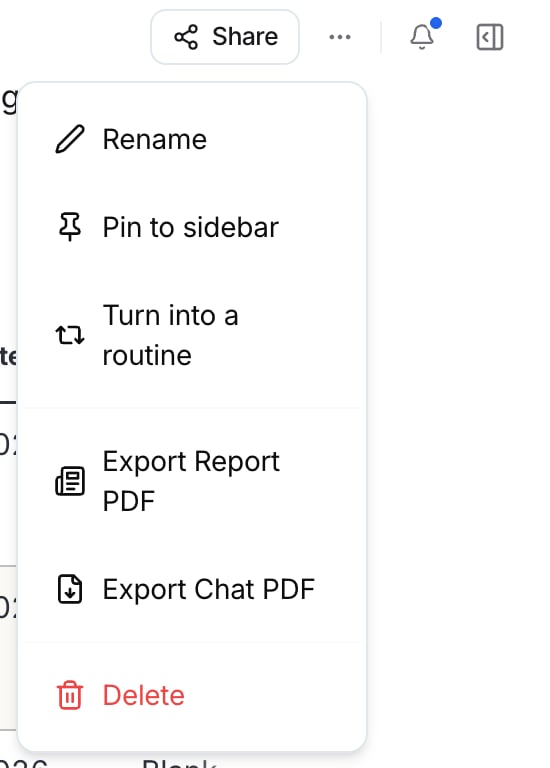
Pin, rename, export, or delete a chat
You can manage a chat from the sidebar or from inside the chat.- From inside the chat
Search your chats
Press ⌘K on a Mac or Ctrl+K on Windows, or select Search & commands at the top of the sidebar.1
Type what you're looking for
The search box says Search chats and pages, or ask Parker…. Parker matches chat titles and message text. It also shows Related, by meaning: chats about the same thing in different words.
2
Narrow the results (optional)
Before you type, select a filter: Chats, Pages, Pinned, From Parker, From me, or Past 7 days.
3
Open a result
Use ↑ and ↓ to move, and then press Enter to open a result. Press → to see the matching messages in a chat. To ask Parker your search as a new question instead, press ⌘↵ on a Mac or Ctrl+Enter on Windows.
The same search box also takes you to other places. Type a destination, such as Routines, and select it under Go to.
Share a chat
Share a chat to show a teammate what you found. You can share only with members of your workspace.1
Open the share dialog
Open the chat and select Share in the chat header.
2
Choose who to share with
In Share conversation, search by name or email, and then select the people you want to share with. The dialog lists your workspace’s Team members.
What does the person I share with see?
- The chat appears in their sidebar under Shared with me.
- They see the answers already in the chat.
- Anything new runs on their own access to Salesforce and other connections, not yours.
Troubleshooting
I can't find an old chat
I can't find an old chat
Select Older in the sidebar, or press ⌘K or Ctrl+K and search for a word you remember from the chat.
My teammate sees different results from me
My teammate sees different results from me
That’s expected. New answers in a shared chat run on each person’s own access, so they see only the Salesforce data they’re allowed to see.
Related
Chat overview
How the chat screen works.
Memory
What Parker remembers.
Keyboard shortcuts
Every shortcut in one place.
Pages
Share a designed report instead.