

Admins only. Only workspace admins can change these settings. If you’re not an admin, you can still see them, but you can’t edit them.
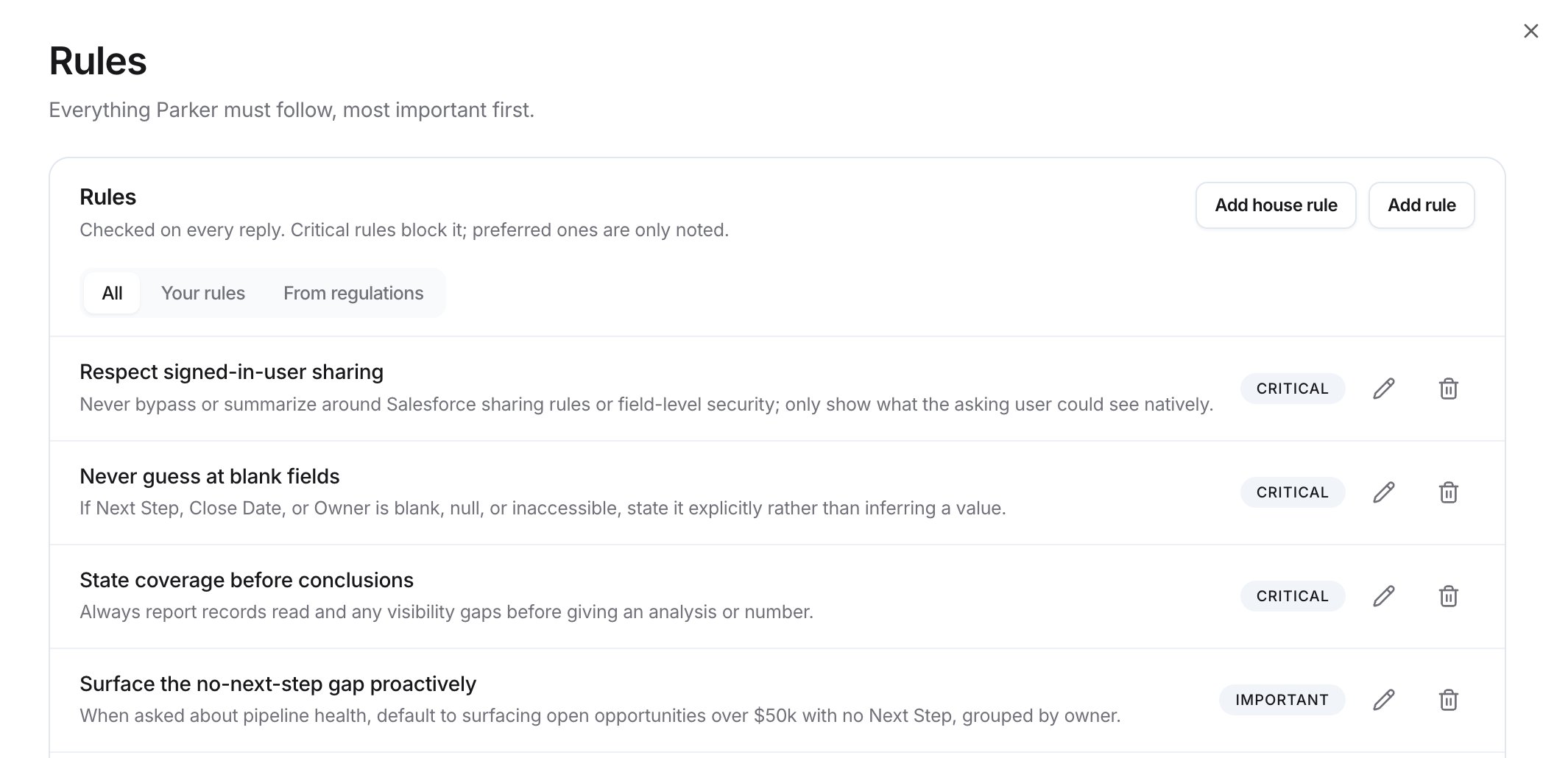
The Rules page
How are rules ordered?
Every rule has a tier. The list shows Critical rules first, then Important, then Preferred. Critical rules block a reply that breaks them. Preferred rules are only noted.How strict is enforcement?
The Enforcement line under the list shows your workspace’s setting, for example “Enforcement: Strict. Every rule is a hard requirement, even if a message asks to skip it.” To change it, select Change. This opens Oversight.Add a rule
There are two ways to add one:- Add rule adds a rule for Parker. You can give it a reason that reviewers see.
- Add house rule adds a rule in plain language that applies right away. You can choose which agents it applies to.
1
Open Rules
Go to Settings > Rules.
2
Start a rule
Select Add rule or Add house rule.
3
Write the rule
For Add rule, enter a short Rule name, then fill in What must the agent do? For Add house rule, fill in Rule and a Short summary.
4
Pick a tier
Under Tier, select Critical, Important, or Preferred.
5
Optional: add context
For Add rule, use Why this rule? (optional) to give reviewers context. Parker never sees it. For Add house rule, set Applies to to All agents or Specific agents, and add a Reference label (optional), such as “Internal policy 3.2”.
6
Save
Select Add rule or Add house rule.
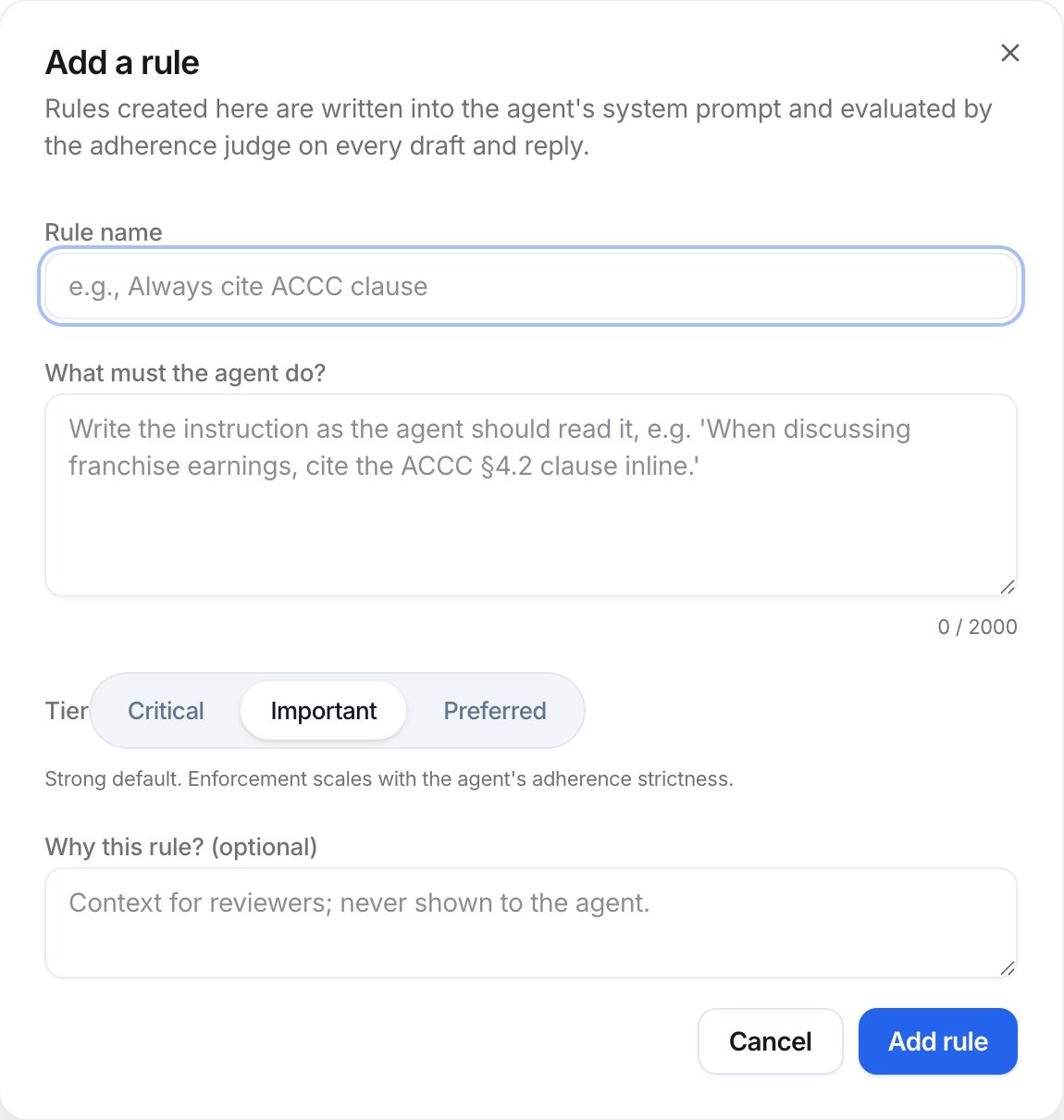
The Add a rule dialog
How do I write a good rule?
- One rule, one behavior. Split “Be polite and never discuss pricing” into two rules.
- Write it as an instruction to Parker. “Always include the quote number in the subject line.”
- Be specific and checkable. “Never offer a discount above 10%” is checkable. “Be careful with discounts” isn’t.
- Pick the lowest tier that works. Save Critical for things that must never happen, because breaking one blocks the reply.
- Use instructions for style, rules for limits. Tone and approach belong in instructions.
Examples
Filter the list
Use All, Your rules, or From regulations to filter. From regulations shows rules taken from compliance documents. Those rules wait for approval in the compliance review queue. See Compliance.Edit or archive a rule
Select the edit icon on a rule to change it. To stop a rule applying, select its archive icon.Add advisory notes
Advisory notes hold Coaching: guidance added to Parker’s instructions. It isn’t checked like rules. Use it for softer guidance, such as “Keep replies to two or three sentences.”Check it worked
The new rule appears in the list under its tier. Then ask Parker for something that would break it, and see whether Parker follows the rule.Tests a pricing rule
Tests a fee-disclosure rule
Troubleshooting
Parker ignored a rule
Parker ignored a rule
Check the rule’s tier and your Enforcement setting. Preferred rules never block a reply. Make the rule more specific, or raise its tier.
Related
Oversight
How strictly Parker’s work is checked.
Compliance
Regulations and rules taken from them.
Write Parker's instructions
Style and approach.