> ## Documentation Index
> Fetch the complete documentation index at: https://support.parker.work/llms.txt
> Use this file to discover all available pages before exploring further.

# What is Parker?

> Learn what Parker is, what it connects to, and where to start, whether you're a sales rep or a workspace admin.

<div className="pk-hero not-prose">
  <p className="pk-hero-title">
    <span className="pk-hero-title-a">AI for Salesforce</span>
    <span className="pk-hero-title-b">that follows your rules.</span>
  </p>

  <p className="pk-hero-lede">
    Parker is the teammate you always wanted. It learns how your people work, gets ahead of what they need, and never steps outside the rules you set.
  </p>

  <div className="pk-stage">
    <ul className="pk-notes pk-notes-left">
      <li className="pk-note pk-c-amber">
        <span className="pk-note-label">Watches your pipeline</span>
        <span className="pk-note-body">Flagged the stalled renewal before you asked.</span>
      </li>

      <li className="pk-note pk-c-violet">
        <span className="pk-note-label">Knows you</span>
        <span className="pk-note-body">Remembered what James said on your last call.</span>
      </li>

      <li className="pk-note pk-c-blue">
        <span className="pk-note-label">Follows your rules</span>
        <span className="pk-note-body">Held the discount for finance sign-off.</span>
      </li>
    </ul>

    <div className="pk-window" role="img" aria-label="Example Parker chat: Sarah asks what to work on this morning, and Parker flags a quiet renewal, connects a teammate's Salesforce update, drafts an introduction, and routes a discount for approval.">
      <div className="pk-window-bar">
        <span className="pk-dots">
          <span />

          <span />

          <span />
        </span>

        <span className="pk-window-name">Parker</span>
      </div>

      <div className="pk-window-body">
        <p className="pk-ask">What do I need to work on this morning?</p>

        <p className="pk-reply">
          Morning, Sarah. <mark className="pk-c-amber">Harbour Group's renewal has gone quiet</mark>, and <mark className="pk-c-teal">Tom added their new CFO, Anna Reid, to Salesforce on Monday</mark>. <mark className="pk-c-violet">On your last call James warned a new CFO would reopen the budget</mark>, so <mark className="pk-c-green">I've drafted an introduction to Anna, in your voice</mark>.
        </p>

        <p className="pk-reply">
          The 10% discount you promised James <mark className="pk-c-blue">needs finance sign-off, so I've sent that to Priya first</mark>.
        </p>

        <div className="pk-composer">
          <span>Ask Parker anything</span>
          <span className="pk-send">↑</span>
        </div>
      </div>
    </div>

    <ul className="pk-notes pk-notes-right">
      <li className="pk-note pk-c-teal">
        <span className="pk-note-label">Knows your team</span>
        <span className="pk-note-body">Connected Tom's Salesforce update to your deal.</span>
      </li>

      <li className="pk-note pk-c-green">
        <span className="pk-note-label">Writes like you</span>
        <span className="pk-note-body">Drafted the introduction in your voice.</span>
      </li>
    </ul>
  </div>

  <div className="pk-hero-actions">
    <a className="pk-btn pk-btn-primary" href="/quickstart">Start the quickstart</a>
    <a className="pk-btn pk-btn-ghost" href="/admin/quickstart">Set up your team</a>
  </div>

  <p className="pk-hero-footnote">Example conversation. Names and companies are fictional.</p>
</div>

Parker works inside the access you already have. When it reads or writes Salesforce, it uses your own Salesforce login, so it sees and changes only what your Salesforce permissions allow.

## Where should you start?

<div className="pk-roles not-prose">
  <a className="pk-role" href="/quickstart">
    <span className="pk-role-tag">Sales reps</span>
    <span className="pk-role-title">Use Parker every day</span>
    <span className="pk-role-body">Connect your Salesforce login and mailbox, then ask your first question.</span>
    <span className="pk-role-link">Open the quickstart →</span>
  </a>

  <a className="pk-role" href="/admin/quickstart">
    <span className="pk-role-tag">Workspace admins</span>
    <span className="pk-role-title">Set up Parker for your team</span>
    <span className="pk-role-body">Connect your company's Salesforce, invite members, and decide how Parker behaves.</span>
    <span className="pk-role-link">Open the admin quickstart →</span>
  </a>
</div>

## What can you do with Parker?

<CardGroup cols={3}>
  <Card title="Ask about Salesforce" icon="message-square" href="/chat/salesforce-questions">
    Find records, pipeline, and activity in plain language, with sources.
  </Card>

  <Card title="Update records" icon="pencil" href="/chat/updating-records">
    Create tasks and change fields. Parker shows you each change first.
  </Card>

  <Card title="Draft and send email" icon="mail" href="/email/drafting-email">
    Write replies and follow-ups in your own voice, from your mailbox.
  </Card>

  <Card title="Build charts and reports" icon="chart-column" href="/chat/charts-maps-diagrams">
    Turn a question into a table, chart, map, or shareable report.
  </Card>

  <Card title="Automate the routine" icon="bot" href="/automate/automations">
    Let Parker act when email arrives, or answer on a schedule.
  </Card>

  <Card title="Use Parker on your phone" icon="smartphone" href="/mobile/overview">
    Text Parker, or reach it in Microsoft Teams. <Badge>Beta</Badge>
  </Card>
</CardGroup>

## What does Parker connect to?

Parker works with the accounts you and your admin connect:

<Columns cols={2}>
  <Card title="Salesforce" icon="cloud">
    Your admin connects your company's Salesforce. Then each person connects their own Salesforce login.
  </Card>

  <Card title="Your mailbox" icon="inbox">
    Microsoft 365 (Outlook) or Gmail, so Parker can read, search, and send from your mailbox.
  </Card>

  <Card title="Your calendar" icon="calendar">
    Microsoft 365 calendar or Google Calendar, so Parker can read availability and book meetings.
  </Card>

  <Card title="Other apps and knowledge" icon="blocks">
    Connectors such as Linear, Notion, and Asana, plus documents and websites your team adds.
  </Card>
</Columns>

You manage your connections in **Settings** > **Connections**. See [Connect your mailbox](/email/connect-mailbox) and, for admins, [Connections and apps](/admin/connections-and-apps).

## Where do you work with Parker?

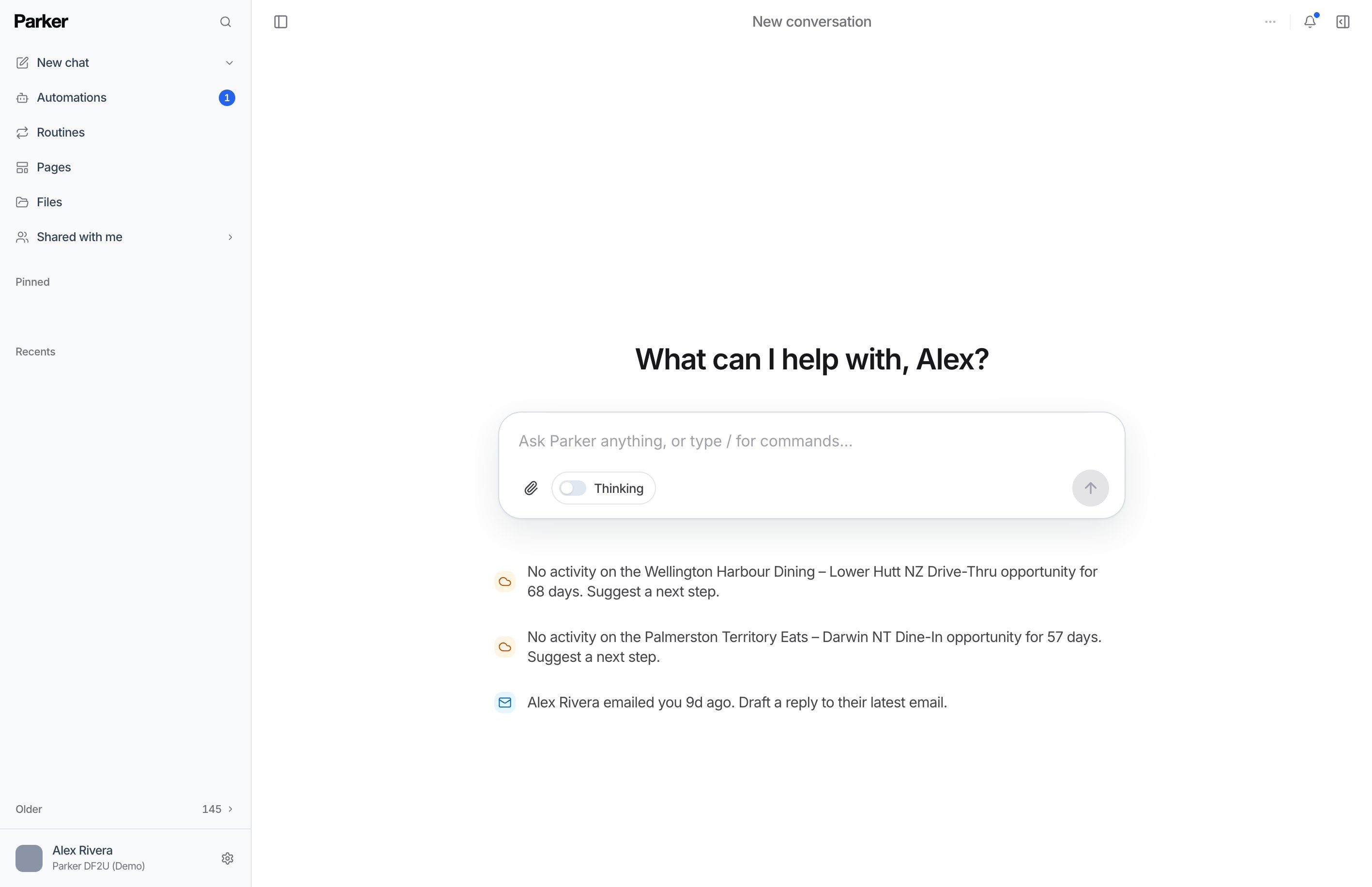
<Frame caption="A new chat in Parker.">
  <img src="https://mintcdn.com/fieldko/KGR1Ih_ky0W1HGS1/images/get-started/introduction-new-chat.png?fit=max&auto=format&n=KGR1Ih_ky0W1HGS1&q=85&s=b12afd94c741fd36edafea2cc1aceeea" alt="Parker's new chat screen: the sidebar with New chat, Automations, Routines, Pages, and Files, and a chat box with suggested next steps." width="2834" height="1832" data-path="images/get-started/introduction-new-chat.png" />
</Frame>

| Surface | What it's for |
| - | - |
| **Chat** | Ask questions, get answers with sources, and ask Parker to draft, update, or build something. Most of your work starts here. |
| **Automations** | Jobs Parker runs on its own when something happens, such as a new email arriving. |
| **Routines** | Questions Parker answers for you on a schedule. |
| **Pages** | Reports and documents Parker designed for you. |
| **Files** <Badge>Beta</Badge> | Your uploaded files and the files Parker exports for you. |

You can also talk to Parker from your phone or Microsoft Teams through a channel <Badge>Beta</Badge>. See [Parker on your phone](/mobile/overview).

## Need a hand?

<div className="pk-help not-prose">
  <a className="pk-help-item" href="/reference/troubleshooting">
    <span className="pk-help-title">Troubleshooting</span>
    <span className="pk-help-body">Fixes for the most common problems.</span>
  </a>

  <a className="pk-help-item" href="/reference/faq">
    <span className="pk-help-title">FAQ</span>
    <span className="pk-help-body">Short answers to frequent questions.</span>
  </a>

  <a className="pk-help-item" href="/get-started/what-parker-can-do">
    <span className="pk-help-title">What Parker can and can't do</span>
    <span className="pk-help-body">Its limits, and how to check an answer.</span>
  </a>

  <a className="pk-help-item" href="/changelog">
    <span className="pk-help-title">What's new</span>
    <span className="pk-help-body">The latest changes to Parker.</span>
  </a>
</div>


This documentation is built and hosted on [Mintlify](https://mintlify.com), a developer documentation platform.