> ## Documentation Index
> Fetch the complete documentation index at: https://support.parker.work/llms.txt
> Use this file to discover all available pages before exploring further.
# Manage your account settings
> Open Settings and change your time zone, sign-in and password, notifications, quiet hours, theme, and density, and switch workspaces or sign out.
Your personal settings live in **Settings** > **General**. This page shows how to open Settings and what each option on **General** does.
## How do I open Settings?
Use any of these:
* In the sidebar, select **Settings** (the gear button next to your name), and then select **Settings**.
* Press **⌘,** on a Mac or **Ctrl+,** on Windows.
* In the chat box, type **/settings** and press **Enter**.
Settings opens over the page you're on, so you don't lose your place. To close Settings, select **Close**.
## What's in Settings?
Settings is grouped by what each section is about:
| Group | Sections | Learn more |
| - | - | - |
| **You** | **General**, **Writing style** | This page, and [Writing style](/email/writing-style) |
| **Parker** | **Agent** | [Agent instructions](/admin/agent-instructions), [Autonomy](/admin/autonomy), [Proactive](/admin/proactive) |
| **Knowledge & rules** | **Knowledge**, **Memories**, **Rules**, **Oversight**, **Compliance**, **Reply notes** Beta | [Memory](/chat/memory-and-private-chats), [Knowledge](/admin/knowledge), [Rules](/admin/rules) |
| **Connections** | **Connections**, **Channels** | [Connect your mailbox](/email/connect-mailbox), [Parker on your phone](/mobile/overview) |
| **Workspace** | **Branding**, **Tools** Beta | [Branding](/admin/branding) |
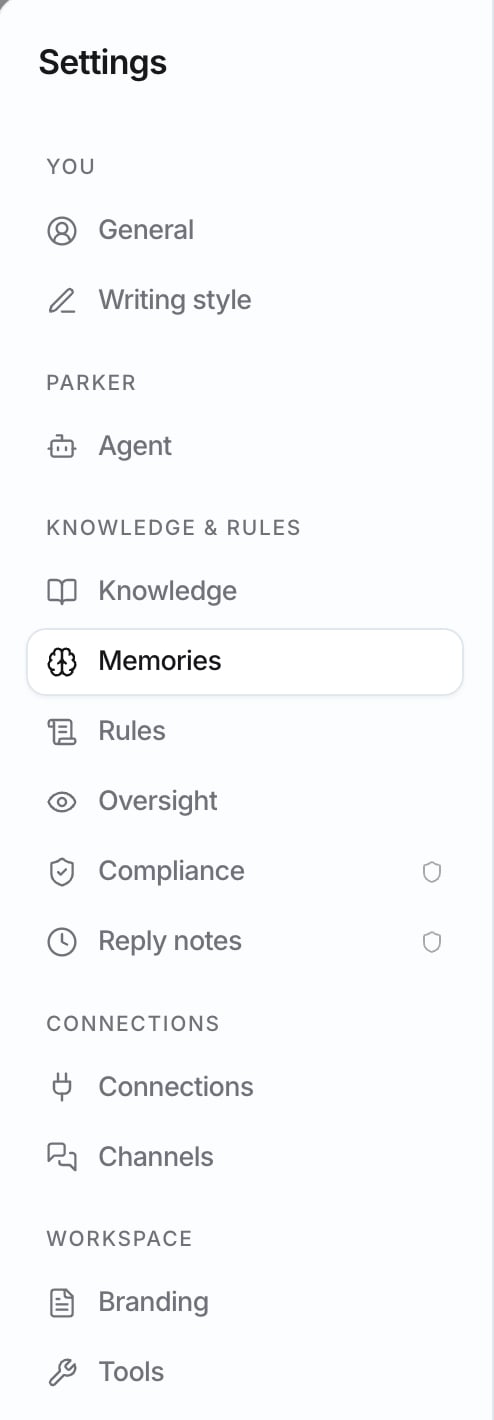 A shield icon next to a section, such as **Compliance**, marks it as an **Admin** section. For every setting in one place, see the [Settings reference](/reference/settings).
## General
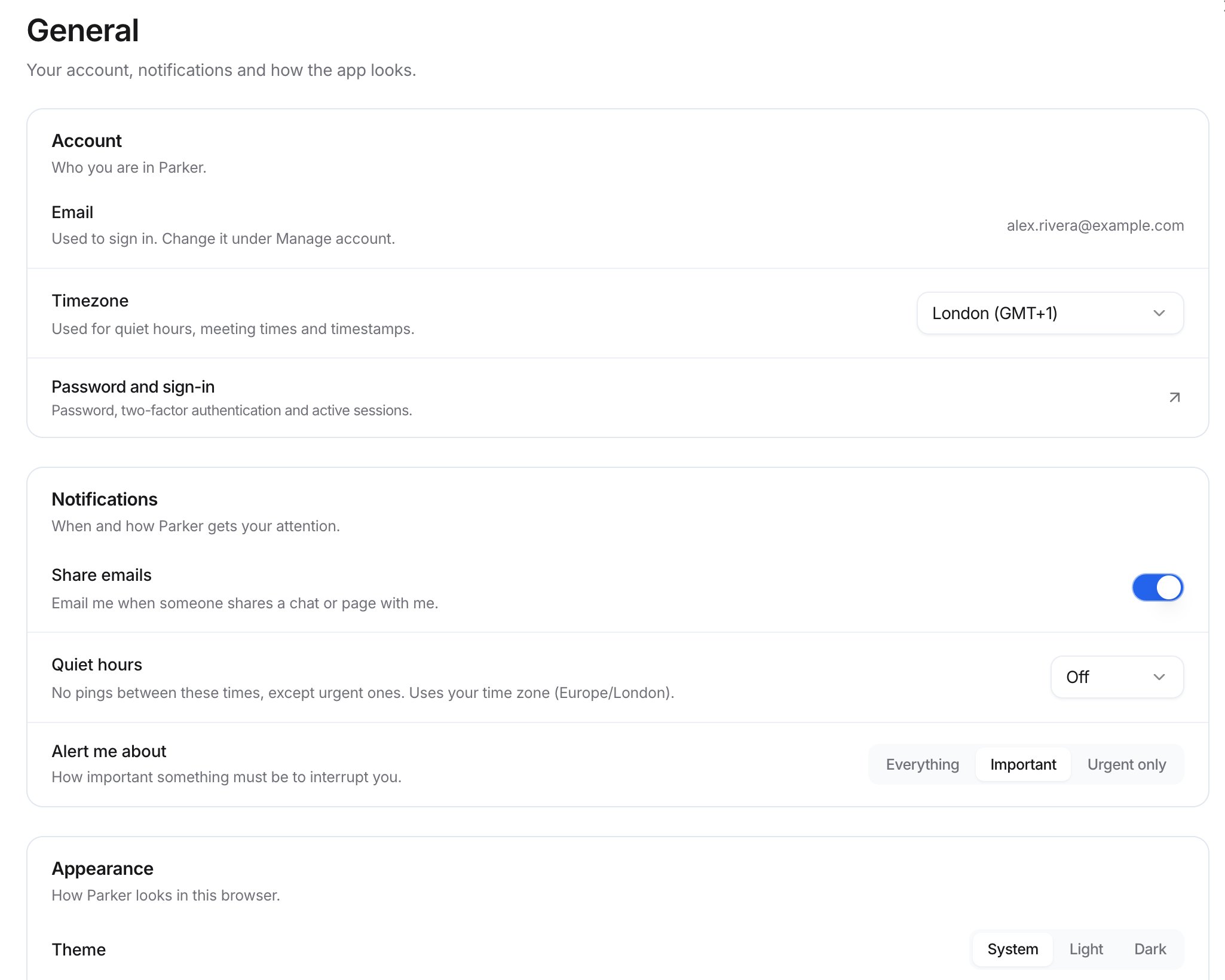
**General** covers your account, notifications, and how the app looks. It has three groups: **Account**, **Notifications**, and **Appearance**.
A shield icon next to a section, such as **Compliance**, marks it as an **Admin** section. For every setting in one place, see the [Settings reference](/reference/settings).
## General
**General** covers your account, notifications, and how the app looks. It has three groups: **Account**, **Notifications**, and **Appearance**.
 ### Account
| Setting | What it does |
| - | - |
| **Email** | The email address you sign in with. To change it, use **Manage account**. |
| **Timezone** | Used for quiet hours, meeting times, and timestamps. |
| **Password and sign-in** | Opens your password, two-factor authentication, and active sessions. |
### Notifications
| Setting | What it does |
| - | - |
| **Share emails** | When on, Parker emails you when someone shares a chat or page with you. |
| **Quiet hours** | Parker doesn't ping you between these times, except for urgent things. Choose the times, or choose **Off**. Quiet hours use your time zone. |
| **Alert me about** | How important something must be to interrupt you: **Everything**, **Important**, or **Urgent only**. |
### Appearance
These settings apply to how Parker looks in the browser you're using.
| Setting | Options |
| - | - |
| **Theme** | **System**, **Light**, or **Dark** |
| **Density** | **Compact**, **Comfortable**, or **Spacious**. Compact fits more on screen. |
## How do I switch workspaces?
If you belong to more than one workspace, select **Settings** (the gear button) in the sidebar. Your workspaces are listed, and the one you're in shows **Current**. Select another workspace to switch to it.
## How do I sign out?
In the sidebar, select **Settings** (the gear button), and then select **Sign out**.
## Troubleshooting
Set **Timezone** in **Settings** > **General**.
**Appearance** settings apply to the browser you're using. Choose them again on the other computer or browser.
If the section has the **Admin** shield icon, only workspace admins can change it. Ask your admin.
## Related
Open Settings, search, and start chats from the keyboard.
Teach Parker how you write.
Connect Microsoft 365 or Gmail.
Every setting, who can change it, and what it does.
This documentation is built and hosted on [Mintlify](https://mintlify.com), a developer documentation platform.
### Account
| Setting | What it does |
| - | - |
| **Email** | The email address you sign in with. To change it, use **Manage account**. |
| **Timezone** | Used for quiet hours, meeting times, and timestamps. |
| **Password and sign-in** | Opens your password, two-factor authentication, and active sessions. |
### Notifications
| Setting | What it does |
| - | - |
| **Share emails** | When on, Parker emails you when someone shares a chat or page with you. |
| **Quiet hours** | Parker doesn't ping you between these times, except for urgent things. Choose the times, or choose **Off**. Quiet hours use your time zone. |
| **Alert me about** | How important something must be to interrupt you: **Everything**, **Important**, or **Urgent only**. |
### Appearance
These settings apply to how Parker looks in the browser you're using.
| Setting | Options |
| - | - |
| **Theme** | **System**, **Light**, or **Dark** |
| **Density** | **Compact**, **Comfortable**, or **Spacious**. Compact fits more on screen. |
## How do I switch workspaces?
If you belong to more than one workspace, select **Settings** (the gear button) in the sidebar. Your workspaces are listed, and the one you're in shows **Current**. Select another workspace to switch to it.
## How do I sign out?
In the sidebar, select **Settings** (the gear button), and then select **Sign out**.
## Troubleshooting
Set **Timezone** in **Settings** > **General**.
**Appearance** settings apply to the browser you're using. Choose them again on the other computer or browser.
If the section has the **Admin** shield icon, only workspace admins can change it. Ask your admin.
## Related
Open Settings, search, and start chats from the keyboard.
Teach Parker how you write.
Connect Microsoft 365 or Gmail.
Every setting, who can change it, and what it does.
This documentation is built and hosted on [Mintlify](https://mintlify.com), a developer documentation platform.